


Log a reading. See how it moves. Know whether it sits in a healthy range.
A personal health-metrics tracker built to be opened on a phone in five seconds and read properly on a laptop. No account, no server, no database — your readings live in your browser and go nowhere unless you tell them to.
Try the live demo → · Deploy your own · How it was built
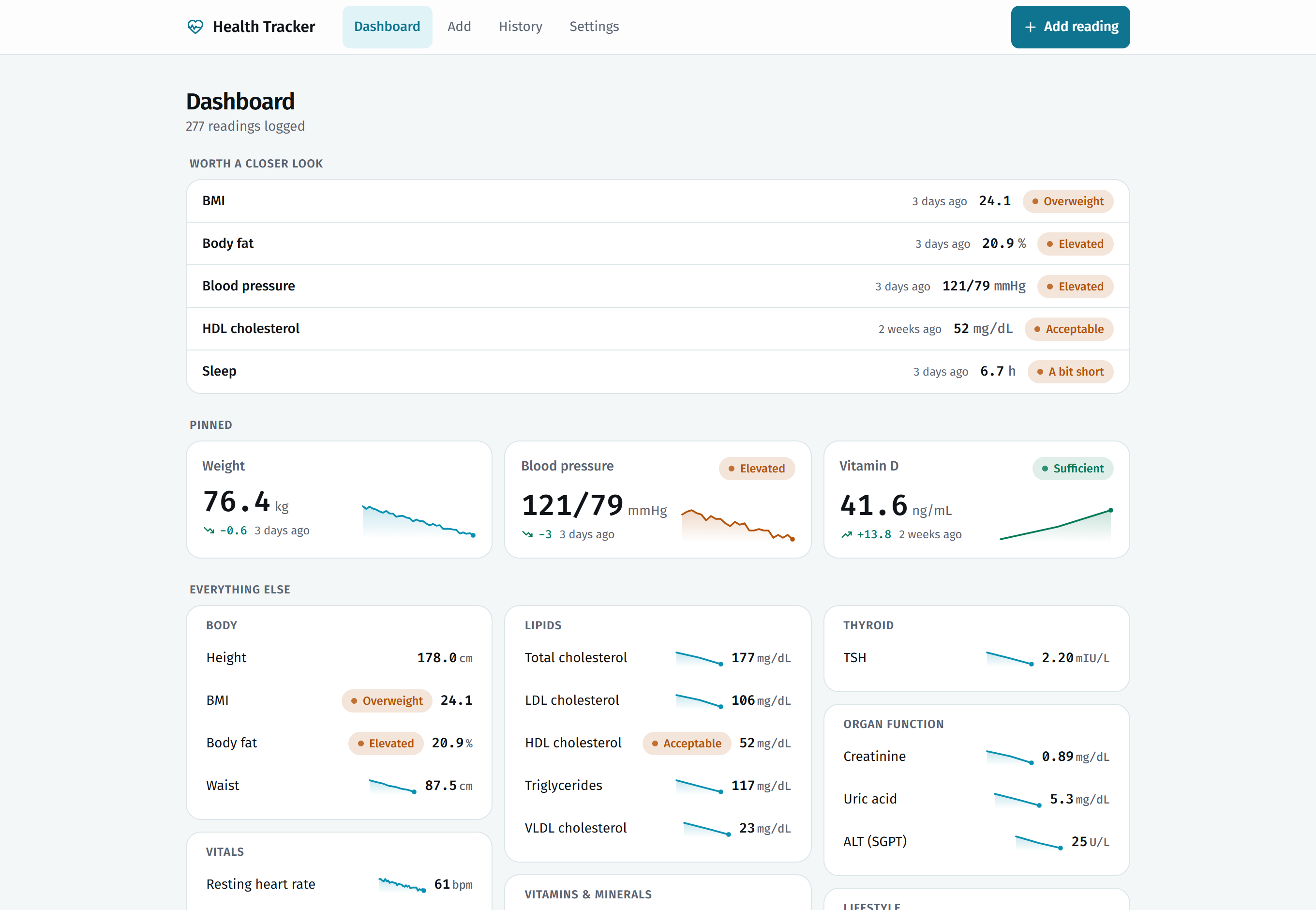
The dashboard, with sample data. It follows your system theme — this screenshot does too.
Health numbers arrive scattered and stay scattered. A lab report as a PDF in
email, a blood-pressure cuff that remembers nothing, a weight you noted in a
chat with yourself. Each number is meaningless alone: 34.1 ng/mL is either
fine or a problem depending on which metric it is, and you have to look that up
every single time.
This app does two things about that. It keeps every reading in one place, and it
knows the reference range for each one — so 34.1 ng/mL shows up as
Sufficient, and a chart shows you the range shaded behind the line.
|
Weight, body fat, waist, blood pressure, resting heart rate, SpO₂, fasting and PP glucose, HbA1c, the full lipid panel including VLDL and Lp(a), vitamin D, B12, ferritin, hemoglobin, TSH and T3, creatinine, uric acid, ALT, PSA, sleep, steps, water. Grouped into eight categories so the dashboard stays readable as it fills up. |
Each metric carries the common adult clinical cutoffs, in the units Indian labs report. A reading is classified the moment you save it and shaded behind its chart, so you read a word rather than look up a number. Seven of them differ by sex — hemoglobin, ferritin, HDL, body fat, waist, creatinine and uric acid — and follow whichever you set in Settings. |
|
Set your height once in Settings and every weight reading becomes a BMI. One height, so there is never a question of which one was used. WHO cutoffs or the lower South-Asian ones, your choice. |
3M / 6M / 1Y / All windows, an optional target line, blood pressure drawn as two lines. Under four readings the trend line stays dashed and says so, instead of implying a trend from three dots. |
|
Worth a closer look surfaces what is out of range or overdue for a re-check. Pinned holds the handful you actually watch. Everything else stays grouped and quiet below. |
It is a PWA — add it to your home screen and it launches full-screen with its own icon, works with no connection, and has app shortcuts straight to Add a reading. |
|
A lipid panel is six trips through a form, which is where logging usually stops. Open the PDF your lab emailed you instead — or paste the text, if you prefer — and every reading it recognises comes out at once, with the collection date read off the page and odd units converted. You check the rows before anything is saved. Both the PDF reading and the parsing are plain code running in your browser — no model, no API call, no upload. A lab report is the most identifying thing here, and it never leaves the device. |
A wrong reference threshold does not crash anything — it quietly reports a reading as Normal when it is not. So every clinical cutoff in the catalogue is pinned by a test, alongside the BMI pairing, the date handling and the report parser. |
 Dashboard |
 Add a reading |
 A single metric |
 |
 |
| 34 readings, a target line, and the window picker. Averages, highs and lows are computed for whatever window you pick. | The reference range, shaded. Three lab draws climbing out of Deficient, through Insufficient, into Sufficient — the dashed line saying there is not yet enough here to call a trend. |

Three ways in, in increasing order of commitment.
1. Open the demo. health-tracker-ssd.vercel.app — add a reading and it is yours, stored in your own browser. Nothing is sent anywhere. Nobody else sees it, including me.
2. Install it. Open that link on your phone, then Share → Add to Home Screen. It becomes an app: own icon, full screen, works on the Underground.
3. Deploy your own. Below. Two minutes, free tier, and then the URL is yours rather than mine.
First run tip. Set your height in Settings once — it is what turns every weight reading into a BMI. Then pin the three or four metrics you actually care about; the dashboard reorganises itself around them.
The app is a Next.js build with no server, no database, and no required environment variables. So deploying is genuinely just this:
Or from your machine:
npx vercelOr push your fork to GitHub and import it at vercel.com/new — every default is already correct.
Any static-friendly host works too (Netlify, Cloudflare Pages, a Raspberry Pi on your desk). There is no backend to stand up.
git clone https://github.com/sartaj1995/health-tracker.git
cd health-tracker
npm install
npm run dev
Then open http://localhost:3000.
npm run build && npm start   # production build
npm test                     # the test suite
npm run lint                 # eslint
Node 18+ is all you need. No database to migrate, no .env to fill in, no API
keys — the app runs complete on a fresh clone.
357 tests over the pure logic, run with npm test and on every pull request.
They exist mainly for one reason: a wrong reference threshold does not crash anything. It quietly reports a reading as Normal when it is not, and there is no way to notice. So every clinical boundary in the catalogue is pinned by a test — HbA1c flipping to Prediabetic range at exactly 5.7, LDL to Near optimal at 100, BMI to Overweight at 23 on South-Asian cutoffs and 25 on WHO. Change a cutoff and a test goes red naming the one you moved.
The rest covers the logic that is easy to get subtly wrong: BMI drawing on one height and one weigh-in per day, dates anchored at local midday so a timezone can never shift a reading a day, and backup parsing dropping unreadable rows without failing an otherwise good restore.
By default: in your browser's localStorage, and nowhere else. No account,
no analytics, no telemetry, no network request that carries a reading. This is
also the honest limitation — your laptop and your phone are two separate stores
that never meet.
There are two ways across.
Export / import. Settings → Export gives you a JSON or CSV file. Import the JSON on another device. Manual, but it is your data in a plain file you can read.
Google Drive backup. Optional and off until you set it up. When on, the app
keeps a single file in your own Drive and re-uploads after every reading, so
two devices stay in step. It uses the drive.file scope, which grants access
only to files this app itself created — the rest of your Drive stays invisible
to it, and because Google classes that scope as non-sensitive there is no
verification review and no "unverified app" warning.
Setting up Drive backup — about five minutes, needs its own Google Cloud project
Do not reuse a Google Cloud project from another app. The OAuth consent screen is per-project, so a shared one would name the wrong app on the dialog you see when connecting, and the two apps would not be cleanly isolated. A new project is free.
- At console.cloud.google.com, create a new
project — call it something like
health-tracker. - APIs & Services → Library, search for Google Drive API, enable it.
- APIs & Services → OAuth consent screen. Pick External, set the app
name to
Health Tracker(this is the name you will see when connecting), and add your own Google account under Test users. - APIs & Services → Credentials → Create credentials → OAuth client ID. Choose Web application.
- Under Authorised JavaScript origins, add both:
http://localhost:3000- your deployed origin, e.g.
https://health-tracker-ssd.vercel.app
- Copy the client ID.
Locally, put it in .env.local (gitignored):
NEXT_PUBLIC_GOOGLE_CLIENT_ID=your-client-id.apps.googleusercontent.comOn Vercel, add the same name and value under Settings → Environment
Variables, then redeploy. The variable is NEXT_PUBLIC_, so it ships to the
browser — which is correct here: this OAuth flow has no client secret, and the
client ID is public by design.
Then open Settings → Google Drive backup and press Connect.
Without a client ID the feature stays hidden rather than half-working, and the app behaves exactly as it does above.
Every line of this app was written by Claude Code. I did not write the components, the reference ranges, the chart code, or the service worker. I described what I wanted, reviewed what came back, and said what was wrong.
That is worth stating plainly rather than burying, because it is the more interesting thing about this repository. The app is a weekend health tracker. The process is the part that might change how you work.
The whole thing was built the way you would build it with a colleague: one branch per change, one pull request each, reviewed before merge.
| PR | What changed |
|---|---|
| #1 | The app — 26 metrics, charts, dashboard, PWA, storage layer |
| #2 | A full visual redesign, run against a vendored design skill |
| #3 | VLDL added to the lipid panel |
| #4 | Stop lowercasing acronyms in metric names |
| #5 | Optional Google Drive backup |
The details I would have got wrong, or never thought about, in a weekend project:
- Dates are parsed at local midday, so a timezone shift can never slide a
reading into the previous day. There is a one-line comment in
lib/stats.tsexplaining exactly that. - Storage sits behind a
HealthRepointerface inlib/storage.ts.localStorageis one implementation; pointing it at an API route later is a new implementation and zero page changes. That seam is why Drive backup landed as an additive PR. - Corrupt or unavailable storage starts clean instead of crashing — private mode, blown quota, a half-written JSON blob.
- Three readings do not get a trend line. The chart goes dashed and says why.
- It shipped metric labels through a title-case helper, which turned
LDLintoLdlandHbA1cintoHba1c. Correct-looking code, wrong for this domain. Fixed in #4. - The dashboard was a flat list that grew every time a metric was added, until it was unreadable at 26. Giving it a hierarchy — worth a closer look, pinned, everything else — took an explicit instruction. The agent will keep adding to a structure long after the structure has stopped working.
- The redesign only became coherent once it had a design system to work
against, rather than "make it look better". The skills it used are committed
in
.claude/skills/so the visual language is reproducible rather than a lucky roll. - It stored height as a dated series, so re-measuring could never rewrite an old BMI. Careful work, and wrong for the people using it: adult height barely moves, and once any height reading existed the height in Settings was silently ignored, so the value you could see was not the value in use. Height is one number in Settings now.
You do not need this repository. You need a clear description of what you want and the willingness to reject the first answer. What made the difference here:
- Say what the thing is for, not what to build. "Opened on a phone in five seconds, read properly on a laptop" shaped more decisions than any component spec would have.
- One change, one branch, one PR. It keeps each diff small enough to actually read, and a bad direction costs you one branch instead of an afternoon.
- Review the domain logic, not the syntax. The code compiles. What needs
your eyes is whether
LDLis spelled right and whether the BMI maths is defensible. - Commit your skills and config.
.claude/is in this repo, so the next session starts where the last one ended.
flowchart LR
    UI["Pages & components<br/><i>Next.js App Router</i>"]
    Store["Store<br/><i>React context</i>"]
    Repo["HealthRepo<br/><i>interface</i>"]
    LS[("localStorage")]
    Drive[("Your Google Drive<br/>one file, drive.file scope")]

    UI <--> Store
    Store <--> Repo
    Repo <--> LS
    Store -.->|"optional, off by default"| Drive

    style Drive stroke-dasharray: 4 4
About 4,100 lines of TypeScript, no state library, no component library, no backend.
0 comments
log in to comment.