

A native macOS app to manage Apple Container workloads — containers, images, logs, stats, and an interactive shell — built with SwiftUI on top of the official container CLI.
- AI log analysis, on-device 🧠 — one Explain click on any container's or machine's Logs tab turns raw output into a concise diagnostic: a health summary, the errors/warnings it found (quoted), the likely cause, and concrete next steps — streamed live. Powered by Apple's Foundation Models, so the model runs entirely on your Mac: your logs (with their secrets, tokens and connection strings) never leave the device — no cloud, no API keys, no subscription. Requires Apple Intelligence on a supported Mac.
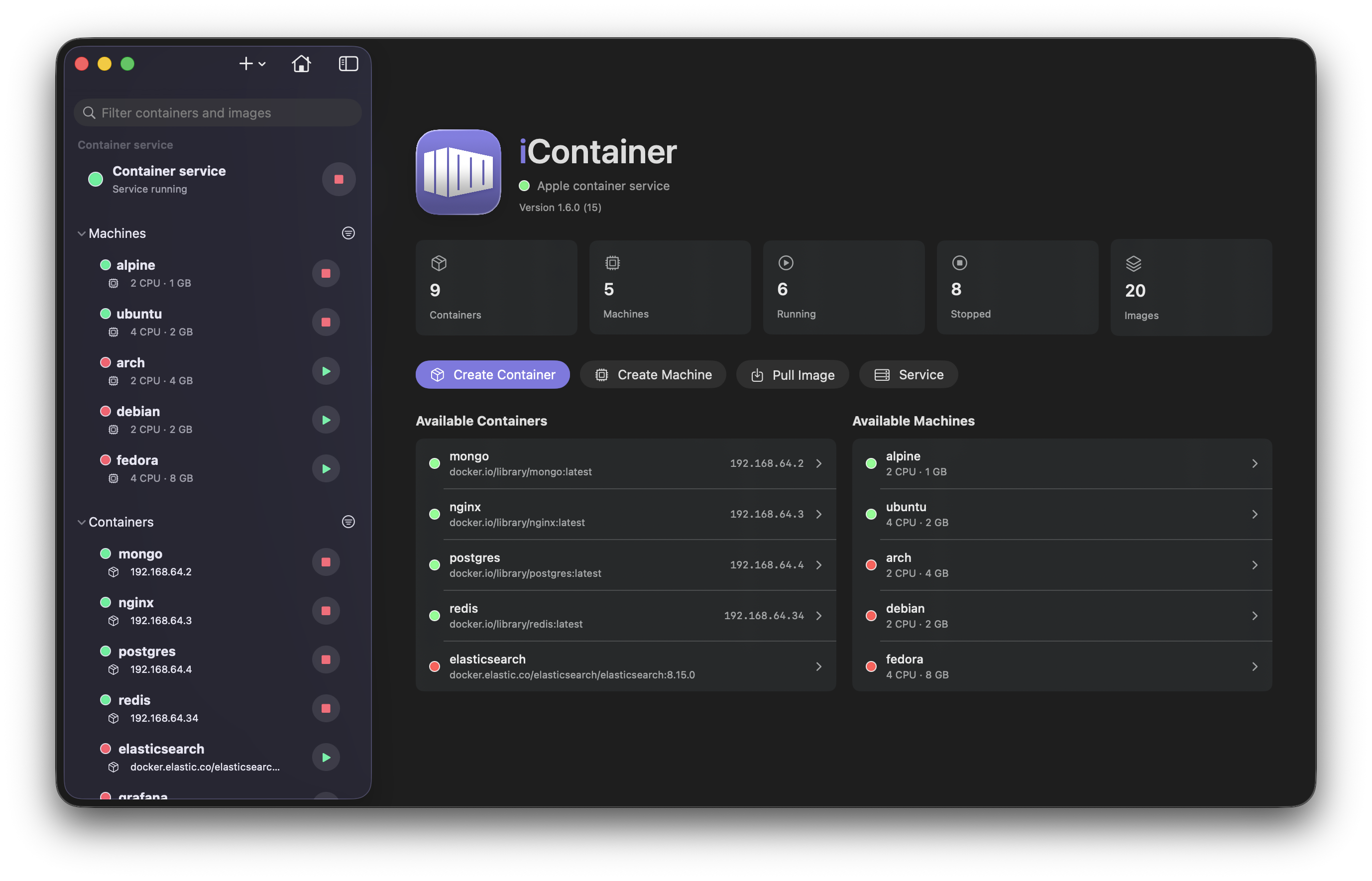
- Dashboard — container, machine, and image counts at a glance, quick actions (create container/machine, pull image), and a two-column overview of available containers and machines.
- Container lifecycle — create (from an image or a Dockerfile build), start, stop, restart, edit settings (ports, volumes, environment), delete. Editing recreates the container with the new configuration.
- Container machines — manage the Linux VMs that host containers (WWDC 2026): create, start/stop, edit (CPUs, memory, home mount), delete, with Info / Shell / Logs tabs per machine.
- Sidebar — reorderable Containers / Machines / Images sections (order, expand state, and filters persist), running/stopped sorting, search, and status filters; live status indicators.
- Per-container detail tabs — Info (network, mounts, DNS, env, exposed-port browser links), Stats with charts, persistent Shell session, Logs with follow mode.
- Images — list, pull, inspect, delete; registry login with guided error handling for auth failures.
- Networks & Volumes — sidebar sections for the service's networks (subnet, attached containers) and volumes (capacity, mounting containers, backing file), with create, delete (blocked while in use, with the reason) and prune.
- Apple container service — start/stop the system service; view CLI vs service version, host info, paths, storage (
container system df), the service defaults (config.toml), service-wide stats, and live system logs. - Docker interop 🐳 — import images from a local Docker installation (
docker save→container image load, no registry round-trip) and create a container from an existing Docker container: iContainer reads itsdocker inspectconfiguration, translates ports, mounts, environment, entrypoint/command, user, resources and network for Apple Container, and lists anything that has no equivalent before you confirm. Docker is never modified. - Docker Compose (MVP) — open a
compose.yaml/docker-compose.yml, review the services it can run and the directives it can't map, then Up / Down the project on a shared per-project network independs_onorder. - Automatic updates — iContainer keeps itself up to date via Sparkle: it checks in the background and installs new versions in place (with your confirmation and the release notes), verified by signature. It also notifies you when a newer release of the
containerCLI is available. - Notifications — optional system notifications when a container stops or an action fails.
- Settings — theme, launch at login, auto-start service, quit behavior, polling cadence, confirmation dialogs, default shell, terminal font, custom CLI path, default registry.
- Menu bar extra — control containers and machines and the service without opening the main window.
- Keyboard shortcuts — full menu bar command set (⌘N new container, ⇧⌘P pull image, ⌘1–⌘4 detail tabs, and more).
- macOS 26 or later (Apple silicon)
- Apple Container CLI installed
- Apple Intelligence enabled (optional) — only needed for the on-device AI log analysis; everything else works without it
- Docker Desktop or a
dockerCLI (optional) — only needed to import images / clone containers from Docker - A DNS domain configured for the container service (optional) — needed for containers to reach each other by name (compose services, cloned Docker stacks): add
[dns]/domain = "test"to~/.config/container/config.toml, restart the service, thensudo container system dns create testonce. The app tells you when it's missing.
- Install the Apple Container CLI: download the latest
.pkgfrom the releases page and install it, confirming the recommended default kernel. - Download the latest iContainer
.dmgfrom Releases, open it and drag iContainer into Applications; or install via Homebrew (see below), or build from source (see below). - Start the container service from the app — everything else flows from there.
If the CLI is missing, the app shows a setup screen with a download link instead of the main UI.
iContainer updates itself via Sparkle: it checks for new versions in the background and, when one is available, shows a prompt with the release notes and installs the update in place once you confirm. Updates are verified against a built-in signature and only install if signed by the maintainer. You can also trigger a check on demand from the iContainer ▸ Check for Updates… menu item.
First launch — release builds are signed with a Developer ID certificate and notarized by Apple, so macOS opens the app without a Gatekeeper warning. (Builds up to and including 2.1.1 were unnotarized; if you're on one of those, right-click the app → Open once, or run
xattr -d com.apple.quarantine /Applications/iContainer.app.)
A dedicated Homebrew tap is the easiest way to keep iContainer up to date without re-authorising the bundle on every release — Homebrew strips the quarantine flag automatically, which sidesteps the Gatekeeper warning above.
brew tap nico81/icontainer
brew install --cask icontainer

# Later, to upgrade to the newest release:
brew upgrade --cask icontainer
Recent Homebrew versions ask you to trust casks from third-party taps. If the install stops with "Refusing to load cask … from untrusted tap", run
brew trust nico81/icontainer(as the error suggests) and re-run the install.
The tap lives at
nico81/homebrew-icontainer;
the canonical copy of the cask formula is vendored here as
Casks/icontainer.rb and mirrored to the tap on
each release.
git clone https://github.com/nico81/iContainer.git
cd iContainer
open iContainer.xcodeproj
Then build and run the iContainer scheme in Xcode. You will need to set your own development team in Signing & Capabilities. From the command line:
xcodebuild -project iContainer.xcodeproj -scheme iContainer -configuration Debug buildUnit tests cover the CLI-output parsing layer:
xcodebuild -project iContainer.xcodeproj -scheme iContainer -testPlan iContainer test- CHANGELOG.md — release history
- docs/PROJECT_CONTEXT.md — architecture and component map
- docs/UI_UX_GUIDELINES.md — UI/UX conventions
- docs/VERSIONING.md — release workflow
Full disclosure: iContainer was vibe-coded — designed and written hand-in-hand with Claude Code. The ideas, the direction, and every "no, not like that" are human; a lot of the typing isn't. It ships with unit tests and gets manually run on each change, but it's a hobby project built for fun on top of brand-new Apple tech — so read the code, kick the tires, and don't run it anywhere you'd cry about. PRs and issues very welcome.
If it saves you some clicks, you can buy me a coffee ☕ — entirely optional, always appreciated.
0 comments
log in to comment.