

A custom Lovelace card for filtering and exporting Home Assistant entities as JSON. Easily search, filter, and export entities for configuration, debugging, or backup purposes.
✨ Created with Vibe Coding - This card was developed using AI assistance to transform ideas into practical code!
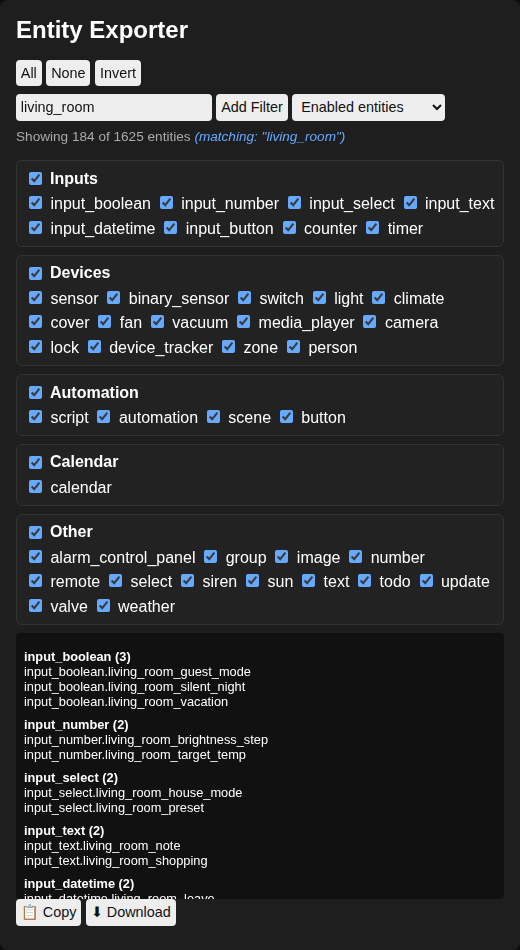
Every domain in your install is listed — anything outside the named groups lands under Other. The dropdown switches between enabled, enabled + disabled, and disabled-only entities:
- Filter entities by domain type — every domain in your install, discovered at runtime
- Show enabled entities, enabled + disabled, or disabled only — Home Assistant keeps disabled entities out of the state machine entirely
- Add multiple text filters with OR relationship (show entities matching any filter)
- Live filtering preview while typing
- Export filtered entities as JSON
- Copy to clipboard (in HTTPS contexts)
- Download as JSON file
- Real-time counter of filtered entities
- Make sure HACS is installed
- Add this repository as a custom repository:
- Go to HACS → Frontend
- Click the three dots in the top right
- Select "Custom repositories"
- Add
https://github.com/marc-schuetze/ha-entity-exporter-cardas URL - Category: Lovelace
- Click "Install" on Entity Exporter Card
- Add the card to your dashboard
- Download
entity-exporter-card.jsfrom this repository - Upload it to your Home Assistant instance under
/config/www/ - Add the resource in your Lovelace configuration:
resources:
  - url: /local/entity-exporter-card.js
    type: module
- Add the card to your dashboard
Add the card to your dashboard:
type: entity-exporter-card- Select domains to filter entities by checking/unchecking domain boxes
- Type in the filter input to find specific entities
- Click "Add Filter" to save filters (multiple filters work as OR conditions)
- Use the dropdown to switch between "Enabled entities", "Enabled + disabled" and "Disabled only"
- Use the copy or download buttons to export the filtered entities as JSON
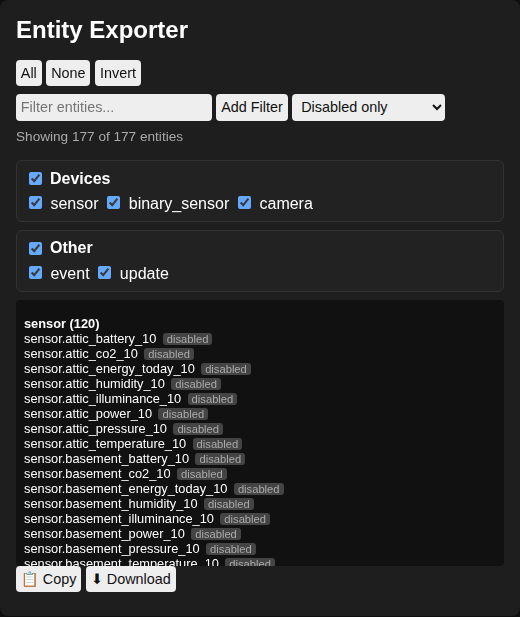
Disabled entities are not in Home Assistant's state machine, so the card reads them from the entity registry instead. The dropdown next to the filter input controls them:
| Option | Shows |
|---|---|
Enabled entities |
Default. Only what is in the state machine; the registry is never read. |
Enabled + disabled |
Both, with the disabled ones marked. |
Disabled only |
Just the disabled entities, and only the domains that actually have any. |
Disabled only is the quick way to pull a list of disabled entity_ids — for instance to feed
them to a bulk renamer when they were created before the device was renamed.
Disabled entities are marked disabled in the preview and exported with a null state and the
reason they are disabled:
"sensor.printer_toner_black": {
  "state": null,
  "disabled_by": "integration",
  "attributes": {}
}
Reading the registry requires an admin account. Non-admin users get an error in place of the list. The registry is read once per session, and only if you switch away from the default option.
type: entity-exporter-card- Domain selection is applied first as a pre-filter
- Text filters are then applied to the domain-filtered set of entities
- Multiple text filters function with OR logic (matches any filter)
- The filter preview updates in real-time as you type
- Clipboard button is automatically hidden when not in HTTPS context
The card has no theme options of its own. It reads the standard Home Assistant theme variables, so it follows whatever theme is active — light or dark — without configuration.
The variables it uses, with the value each falls back to if a theme does not define it:
| Variable | Used for | Fallback |
|---|---|---|
--ha-card-background / --card-background-color |
Card surface | #1e1e1e |
--ha-card-border-radius |
Card corners | 8px |
--ha-card-box-shadow |
Card shadow | 0 0 6px rgba(0, 0, 0, 0.4) |
--primary-text-color |
Body text, inputs, buttons | white |
--secondary-text-color |
The "Showing X of Y entities" line | #aaa |
--secondary-background-color |
Domain sections, preview pane, filter tags | #222 |
--divider-color |
Section borders, tag hover | #333 |
--primary-color |
Checkboxes, live-filter hint | #6af |
--success-color / --error-color |
Copy and download button feedback | #3a3 / #a33 |
To restyle a single card rather than the whole theme, use card-mod and override the same variables:
type: entity-exporter-card
card_mod:
  style: |
    :host {
      --secondary-background-color: #2b2b3a;
      --primary-color: #ff9800;
}This card is specifically designed to work as a bridge between AI systems and Home Assistant:
- Extract structured data to share with AI assistants for analyzing your setup
- Generate automations and scripts by giving AI precise entity information
- Troubleshoot issues by exporting problematic entities with their states
- Speed up configuration by providing context to AI tools
This card was created using what I call "vibe coding" - a collaborative approach between human creativity and AI assistance. The development process involved:
- Designing the filtering logic and UI components with AI guidance
- Debugging complex issues like focus retention and clipboard detection
- Implementing proper integration with Home Assistant's internal APIs
- Refining the card's behavior based on testing feedback
Read more about this approach in VIBE_CODING.md.
This project welcomes contributions! Ideas, bug reports, and pull requests are all appreciated.
MIT License - See LICENSE file for details
0 comments
log in to comment.