


Interactive, realtime, self-hosted Alertmanager UI

Jarvis is an open source web frontend for Prometheus Alertmanager — interactive, realtime, and self-hosted.
It was inspired by Karma, which is a great project. However, I was missing features that matter for day-to-day on-call work: full persistence across restarts, the ability to comment on individual alerts, a claiming system so the team knows who is handling what, and a solid foundation to build further operational tooling on top of. Jarvis is the result.
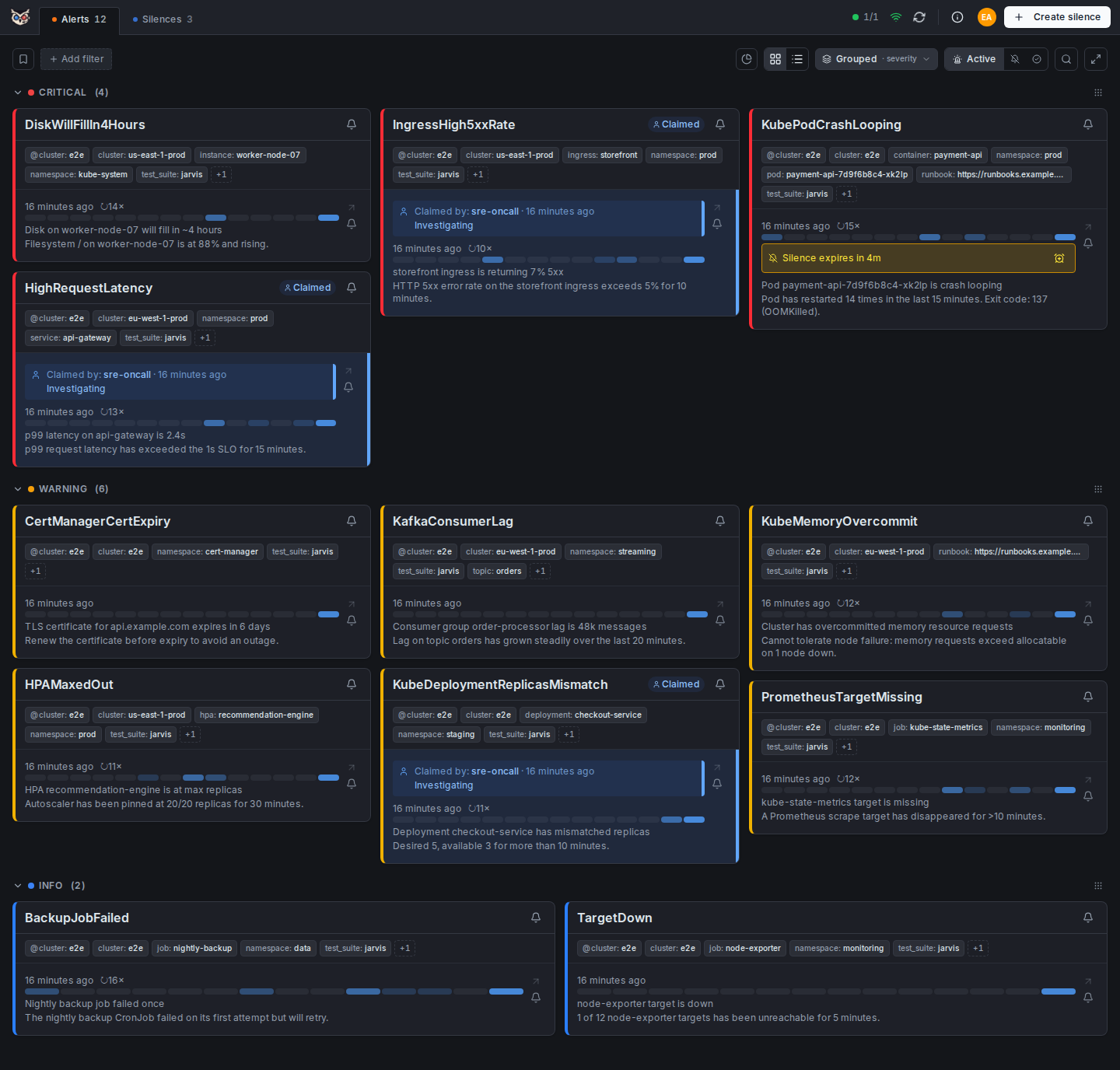
Two and a half minutes through Jarvis: every cluster live, the full alert history, claims and comments, and silences with a preview.
Most Alertmanager UIs are read-only dashboards. Jarvis is built for teams that need to act on alerts, not just observe them:
- Realtime alerts via WebSocket — no page reload required
- Persistent history — full alert lifecycle stored in SQLite or PostgreSQL, with a grace period that prevents ghost-resolve noise on a missed poll
- Claiming & comments — assign an alert to yourself, leave fingerprint-bound notes that survive restarts and re-fires
- Multi-cluster & Alertmanager HA — every cluster live in one view; point one cluster at an HA gossip group and alerts are deduplicated by fingerprint
- Silences with confidence — live preview of exactly what a silence will hit before you create it, one-click Fast-Silence, reusable templates
- Saved filters — Alertmanager matcher chips, shareable via URL, one marked as your default
- Per-cluster upstream auth — OAuth2 client credentials (auto-refresh), bearer token, basic auth or custom headers, for a protected Alertmanager
- Single binary — one container; SQLite needs no external service, switch to PostgreSQL to run several replicas; a Helm chart is included
- User authentication — optional UI login: built-in accounts with an admin panel, or any OIDC provider
Worried about feature creep? Jarvis has a deliberately focused scope — what it is and what it will never become is written down in Scope. The full feature list, with screenshots, is in Features. The full documentation — getting started, deployment, configuration reference, concepts — is at kj187.github.io/jarvis.
AI writes the code; 20 years of software engineering experience — 9 of them in DevOps/platform engineering — directs it, so this isn't vibe-coded. Every commit and CI run enforces the same bar as hand-written code: gosec, govulncheck, golangci-lint, pnpm audit, plus defense-in-depth hardening (strict CSP, read-only container filesystem, no-new-privileges). See Security Policy for details.
No clone needed — runs entirely from the published image.
All you need is Podman or Docker, and a reachable Alertmanager — the
snippet below does not start one. Replace http://alertmanager:9093 with your
own instance; if it runs outside this compose network, use its real address.
Just looking around? the demo guide brings up Jarvis and a throwaway Alertmanager filled with realistic alerts in five minutes.
services:
  jarvis:
    image: ghcr.io/kj187/jarvis:2.0.0
    ports:
      - "8080:8080"
    volumes:
      - jarvis_data:/data
    read_only: true
    tmpfs:
      - /tmp
    security_opt:
      - no-new-privileges:true
    cap_drop:
      - ALL
    environment:
      JARVIS_CLUSTER_1_NAME: dev
      JARVIS_CLUSTER_1_ALERTMANAGER_URL: http://alertmanager:9093
    restart: unless-stopped

volumes:
  jarvis_data:
podman compose up -dNow open http://localhost:8080. Kubernetes/Helm, signature verification and upgrade notes are in Kubernetes deployment and Upgrading; every environment variable is listed in Configuration reference.
Important: Jarvis is an internal tool designed for deployment behind a VPN or authentication proxy, not for direct public internet exposure. See Security model for deployment assumptions and threat model.
Jarvis uses the Alertmanager HTTP API v2 exclusively — introduced in Alertmanager 0.16.0. See Compatibility for the tested versions.
Contributions are welcome! Please read our Contributing Guide for details on the development workflow, pull request process, and coding standards.
Apache 2.0 — see LICENSE
0 comments
log in to comment.