

A sci-fi desktop widget for Windows that shows how much of your AI coding quota is left, for every Codex / ChatGPT account, xKiro, and Claude Code, on this PC and on a remote Linux box. Built with Claude Code (Claude Opus 5.5).

(demo data)
ไทย: ดูหัวข้อ ภาษาไทย ด้านล่าง · 中文:见下方 简体中文 · Looking for CPU/GPU monitoring? See system-hud-widget.
⬇ Latest release (prebuilt Windows zip): no build needed.
Pick an edition (same app, you can switch any time from right-click → Edition):
| Lite | Full | |
|---|---|---|
| ★ USE on the account with the most quota left | ✓ | ✓ |
| Provider tabs ALL / OPENAI / ANTHROPIC, grouped by plan and model | ✓ | ✓ |
| Sort by last used / soonest reset / most left / most used | ✓ | ✓ |
| Bonus check folds to one line (click to open, opens itself on an early reset) | ✓ | ✓ |
| Font picker, severity colours, readable at small sizes | ✓ | ✓ |
| Windows alerts: low quota (30 / 20 / 10 / 5 % left), runs out before reset, window reset, bonus reset | ✓ | |
| Compact rows, one line per account (hover for details) | ✓ | |
| 7-day usage sparkline + "out in ~X at this pace" | ✓ | |
| Usage history window: 7 / 15 / 30 days per account, use per day, burn rate | ✓ |
…-lite-standalone.zip/…-full-standalone.zip: just unzip and runQuotaWidget.exe(needs Python 3 only)…-lite-framework.zip/…-full-framework.zip: tiny, need the .NET 8 Desktop Runtime + Python 3
| Lite | Full | Full, compact |
|---|---|---|
 |
 |
 |
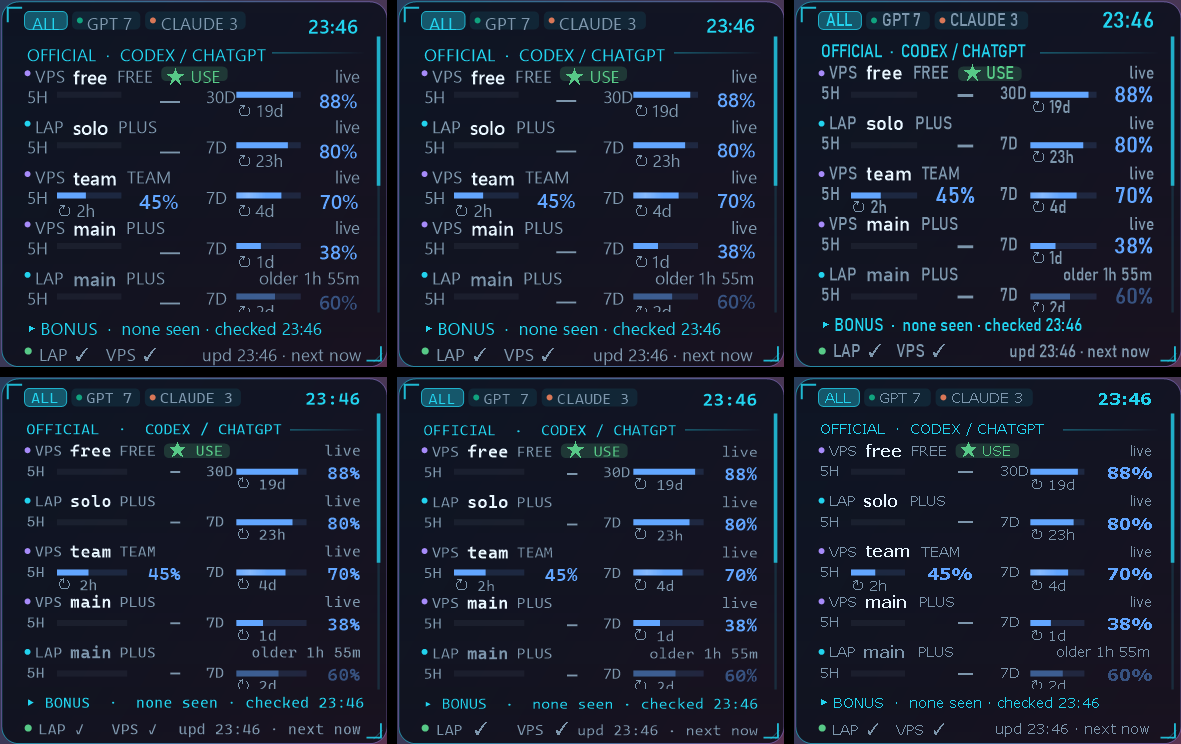
(screenshots use demo data)
Keep collector.py next to the exe. Right-click the widget for settings. Windows SmartScreen may warn because the exe is unsigned; build from source below if you prefer.
System HUD and AI Quota HUD are made to sit together:

(AI quota rows use demo data)
- Drag one close to the other: it snaps edge to edge
- Right-click → Group with … → Linked: move and resize together; stacked, AI Quota HUD takes the HUD's width so the two read as one panel, with a single clock and the date on top
- Same colours + font: theme, background, opacity, frame and font follow each other (turn it off to style them separately); Split apart to go back to two widgets
- Right-click → Background → Frame: none for a borderless look
It never calls a model. It only reads what the tools already write:
- Codex CLI:
~/.codex*/sessions/**/*.jsonl, therate_limitsfield oftoken_countevents (5-hour / 7-day / 30-day windows,used_percent,resets_at). - Claude Code:
~/.claude*/projects/**/*.jsonl, theusageof each message (tokens in the last 5 h, 24 h, 7 d). - xKiro (optional):
GET https://api.xkiro.com/v1/usage, a meter read, not a generation, so it costs nothing.
It never opens auth.json or any credential file. The xKiro key stays on the machine that runs the collector; only numbers come back.
-
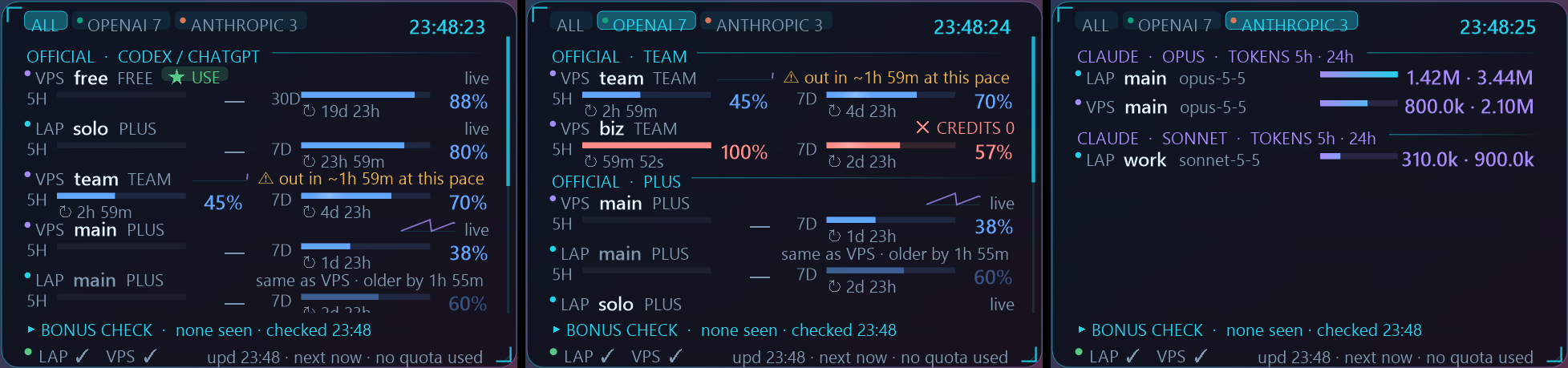
One row per account, the same two columns on every row (5H | 7D/30D): a bar of what is left, the % right-aligned, the countdown under the bar; status on the right (✓ READY, ✕ CREDITS 0, ⏱ stale, ⚠ out in ~X)
-
Severity colours independent of the theme: blue fine, amber ≤30 % left, red ≤10 %, green ready; every status also has a symbol, so nothing relies on colour alone
-
xKiro: dollars left in the 5 h and 7 d windows, free tokens used today, wallet
-
Provider tabs in the title bar: ALL · OPENAI · ANTHROPIC (plus any new provider the collector finds). OPENAI groups by plan (TEAM / PLUS / FREE…), then xKiro, then other / no-login homes; ANTHROPIC groups Claude by model (OPUS / SONNET / HAIKU), most used first
-
★ USE marks the account with the most quota left; sort by last used, soonest reset, most left or most used
-
Plans that only report a 7-day window show a quiet "—" in the 5H column, so rows stay aligned
-
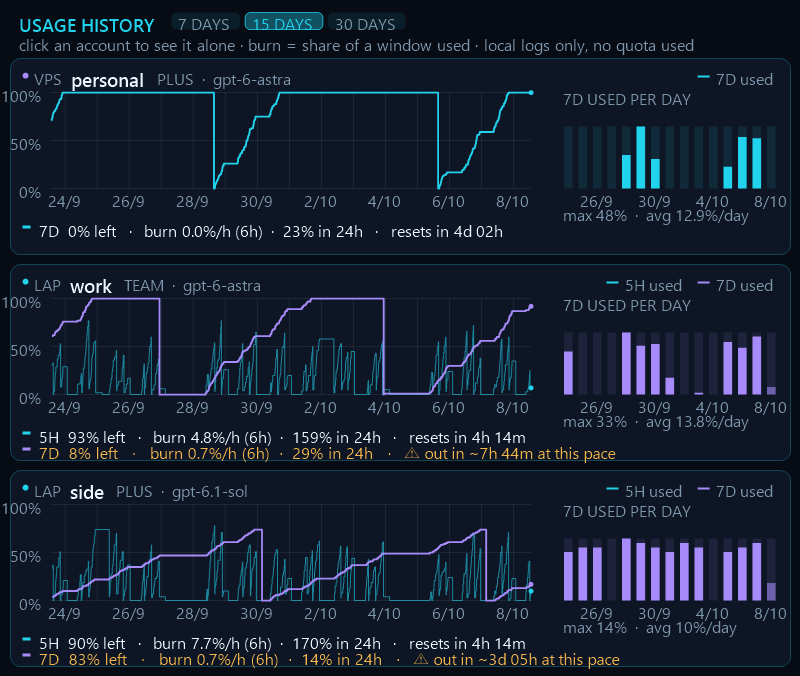
Usage history (Full): click an account row, or right-click → Usage history…. Every window of every Codex account over 7, 15 or 30 days, how much of the weekly window each day used, and the burn rate now (%/h over the last 6 h, % in the last 24 h, ⚠ when the pace runs out before the reset). Click a card to see one account larger; double-click for all again. Claude Code homes get a card too, in tokens per hour and per day (their logs have no limit %). Right-click the window for always on top, opacity, theme, dark / light and a borderless HUD look. It reads the last 31 days straight from the logs, so it is full from the first start
-
Low-quota alerts (Full): a Windows notification when a window gets low (right-click → Edition → Low-quota alert at 30 / 20 / 10 / 5 % left), when the pace would run it out before the reset, when it resets, or on a bonus reset; click the notification to open the history
-
Bonus / early reset check: folds to one line (click its header) and opens itself when a new one shows up; each refresh is compared with the last; if usage drops or the reset time moves earlier before the scheduled reset, it flags EARLY RESET with the time (kept 48 h)
-
Same account on LAP and VPS: rows stay separate (each with its own countdown); the one with the older log sits underneath, dimmed, with "same as VPS · older by …" (hover any row for twin, plan and model details)
-
Shows 5 rows; scroll with the mouse wheel for the rest
-
8 colour themes, dark / light, glass / tinted / solid / floating, panel and whole-widget opacity
-
Row names: put
home=nameorSOURCE/home=namelines in%APPDATA%\QuotaWidget\names.txt(e.g.LAP/.codex=work); homes that are logged in but not used yet already get a row -
Font picker (right-click → Font): Segoe UI (GitHub style, default), Segoe UI Variable, Bahnschrift, Cascadia Mono, Consolas, Arial, Verdana, Inter if installed; only fonts on your PC are listed
-
Resize with Ctrl + wheel, by dragging the corner, or from the menu (60 to 220 %); below ~80 % the text keeps a readable size and the layout narrows, with short labels (GPT / CLAUDE, 2h)
-
Pin to desktop like Rainmeter's "On desktop" (stays after Win+D), Always on top, or click-through overlay
-
Light animations (gliding bars, shimmer, pulse when full), can be turned off
-
Plain WinForms (.NET 8) + a small Python collector, about 70 MB RAM (see How light is it?)


Needs the .NET 8 SDK and Python 3 on Windows 10/11.
dotnet publish -c Release -o publish
publish\QuotaWidget.exe
Right-click the widget for every option; double-click to refresh now.
Create ~/.vps_env on the Windows PC:
export VPS_HOST=your.server
export VPS_USER=you
export VPS_KEY=~/.ssh/your_key
The widget runs collector.py there over SSH (python3 -, key login only, BatchMode=yes). Nothing is written on the server.
For xKiro put the key in ~/.config/xkiro/key (or set XKIRO_KEY_FILE), and set XKIRO_CODEX_HOMES to the Codex homes that route through xKiro if they are not in ~/.config/xkiro/codex/*.
Measured on a 16-thread laptop (60-second average, both widgets running side by side, animations on):
| Process | CPU (share of the whole PC) | RAM |
|---|---|---|
| AI Quota HUD | about 1-2 % | about 70 MB |
| System HUD | about 0.8 % | about 85 MB |
| SensorBridge (optional, temperatures) | about 0.1 % | about 27 MB |
Want it lighter?
- Right-click → Show → Animations off: the biggest saving; the widget then only redraws when a value changes
- AI Quota HUD: Refresh every 10 or 30 min (the collector runs once per refresh); Lite edition instead of Full
- System HUD: hide the 60 s history graph or Threads + memory; turn off Network, ping + disk if you do not need it
- Close SensorBridge if you do not need temperatures
- Codex only writes rate limits when an account is used, so an idle account shows its last reading; RESET ✓ READY means the scheduled reset time has passed.
- Some plans report one window only (Plus reports 7 days); the missing 5H column reads "—" instead of a guess.
- Claude Code logs have no limit percentage, so the Anthropic line of the reset check is a manual reminder.
See CHANGELOG.md for what changed in each release, and SECURITY.md for what the widget reads and how to report a problem.
Want a feature or found a bug? Tell me either way, all ideas welcome:
- GitHub: open an issue
- X (Twitter): mention or DM @Pakapong26
วิดเจ็ตเดสก์ท็อปสำหรับ Windows ดูว่าโควต้า AI เหลือเท่าไร ครบทุกบัญชี Codex/ChatGPT, xKiro และ Claude Code ทั้งในเครื่องและบน VPS ทำด้วย Claude Code
- ไม่กินโควต้า ไม่เรียก AI อ่านแค่ไฟล์บันทึก ไม่เปิดไฟล์ล็อกอิน
- ดู % ที่เหลือของรอบ 5 ชม. / 7 วัน / 30 วัน พร้อมนับถอยหลังรีเซ็ต
- xKiro ดูเงินที่เหลือ โควต้าฟรีรายวัน และ wallet
- ตรวจจับรีเซ็ตโบนัสก่อนกำหนด (ส่วนนี้พับเหลือบรรทัดเดียวได้ กางเองเมื่อเจอ)
- ดีไซน์ v1.3: สีบอกระดับความเสี่ยงไม่ขึ้นกับธีม (น้ำเงินปกติ / เหลืองเหลือ ≤30% / แดงเหลือ ≤10% / เขียวพร้อมใช้) มีสัญลักษณ์กำกับทุกสถานะ แถบแสดงส่วนที่เหลือ ทุกแถวมี 2 คอลัมน์ตรงกัน (5H | 7D)
- เลือกฟอนต์ได้ (คลิกขวา → Font) ค่าเริ่มต้น Segoe UI แบบ GitHub และย่อเล็กแล้วตัวหนังสือยังอ่านได้
- แท็บบนหัววิดเจ็ต ALL / OPENAI / ANTHROPIC คลิกเลือกได้ OPENAI แบ่งกลุ่มตามแพ็กเกจ (TEAM / PLUS / FREE) + xKiro + อื่นๆ ส่วน ANTHROPIC แบ่งตามโมเดล (OPUS / SONNET / HAIKU) เรียงจากใช้มากไปน้อย ถ้ามีเจ้าใหม่จะขึ้นแท็บเพิ่มเอง
- มี 2 รุ่นให้เลือก สลับได้ในเมนูคลิกขวา → Edition
- Lite: ★ USE บอกบัญชีที่ควรใช้, เรียงตามรีเซ็ตก่อน / เหลือมากสุด / ใช้มากสุด, ป้าย no 5H แทนช่องว่าง
- Full: ทุกอย่างใน Lite + แจ้งเตือน Windows (โควต้าใกล้หมด เลือกได้ 30 / 20 / 10 / 5% / ใช้เร็วจนจะหมดก่อนรีเซ็ต / รีเซ็ตแล้ว / bonus reset), แถวแบบย่อ (ชี้เมาส์ดูรายละเอียด), กราฟใช้งาน 7 วัน และบอกว่าจะหมดในอีกกี่ชั่วโมงถ้าใช้ในอัตรานี้
- หน้าประวัติการใช้ (v1.5): คลิกที่บัญชีไหนก็เปิดดูย้อนหลังของบัญชีนั้น เลือกช่วง 7 / 15 / 30 วันได้ เห็นกราฟ % ที่ใช้ แท่งใช้ไปวันละเท่าไร และอัตราการใช้ตอนนี้ (burn rate) ดับเบิลคลิกเพื่อกลับไปดูทุกบัญชี บัญชี Claude Code ดูเป็นจำนวน token ต่อชั่วโมง/ต่อวัน (log ของ Claude ไม่มี % โควต้า) คลิกขวาปรับได้: ค้างบนจอ, ความโปร่งใส, ธีมสี, มืด/สว่าง, ไม่มีกรอบ อ่านย้อนหลังจาก log ได้ทันทีตั้งแต่เปิดครั้งแรก
- บัญชีเดียวกันที่เห็นทั้งในเครื่องและบน VPS จะมีป้าย
= LAP/= VPSและแถวที่ log เก่ากว่าจะจางลงพร้อมบอกว่าเก่ากว่ากี่นาที - โชว์ 5 แถว เลื่อนดูที่เหลือได้, 8 ธีม, มืด/สว่าง, ปรับความโปร่งใส, ย่อขยาย, ปักบนเดสก์ท็อปแบบ Rainmeter
ดาวน์โหลด: หน้า Release ล่าสุด ไม่ต้อง build
- ไฟล์
standaloneแตก zip แล้วเปิดQuotaWidget.exeได้เลย (ต้องมี Python 3) - ไฟล์
frameworkขนาดเล็ก ต้องลง .NET 8 Desktop Runtime + Python 3 - วาง
collector.pyไว้ข้าง exe คลิกขวาที่วิดเจ็ตเพื่อตั้งค่า
Build เอง: ลง .NET 8 SDK และ Python 3 แล้วรัน dotnet publish -c Release -o publish
อยากได้ฟีเจอร์อะไรหรือเจอบั๊ก บอกได้ทั้ง เปิด issue บน GitHub หรือแท็ก / DM มาที่ X @Pakapong26 ยินดีรับทุกไอเดียครับ
กินเครื่องแค่ไหน: วัดบนโน้ตบุ๊ก 16 เธรด เปิดคู่กัน มีแอนิเมชัน: AI Quota HUD ราว 1-2% CPU / 70 MB, System HUD ราว 0.8% / 85 MB, SensorBridge ราว 0.1% / 27 MB อยากให้เบาลง: ปิด Animations (ลดได้มากสุด), ตั้ง Refresh every 10-30 นาที, ใช้รุ่น Lite, ซ่อนกราฟหรือแถวเน็ต และปิด SensorBridge ถ้าไม่ต้องการอุณหภูมิ
Windows 桌面小部件,显示每个 Codex / ChatGPT、xKiro 和 Claude Code 账号还剩多少 AI 额度(本机和 VPS 都可以),使用 Claude Code 制作。
- 不消耗额度:不调用任何 AI,只读取本地日志,从不打开登录凭据文件
- 显示 5 小时 / 7 天 / 30 天窗口剩余百分比和重置倒计时;xKiro 显示剩余金额、每日免费额度和钱包
- 检测提前(奖励)重置;★ USE 标出当前最适合使用的账号
- 标题栏标签页 ALL / OPENAI / ANTHROPIC:OpenAI 按套餐分组(TEAM / PLUS / FREE)+ xKiro + 其他,Anthropic 按模型分组(OPUS / SONNET / HAIKU)
- 风险颜色与主题无关:蓝色正常,黄色剩余 ≤30 %,红色剩余 ≤10 %,绿色可用,并配有符号(⚠ ✓ ✕ ⏱)
- 两个版本:Lite(简洁)和 Full(Windows 通知、紧凑行、7 天曲线、按当前速度预计何时用完),右键 → Edition 随时切换
- 使用历史(Full,v1.5):点击任一账号查看它的历史,可选 7 / 15 / 30 天,显示每天用量和当前消耗速度,双击返回全部账号;Claude Code 以每小时 / 每天 token 显示;右键可置顶、调透明度、主题和无边框;额度不足提醒可设为剩余 30 / 20 / 10 / 5 %
- 字体选择、边框(完整 / 淡 / 无)、缩小后文字仍清晰;行名称可在
%APPDATA%\QuotaWidget\names.txt中自定义 - 与 System HUD 组合使用:自动吸附,「Group」模式下一起移动和缩放,宽度一致,共用颜色与字体,只保留一个带日期的时钟
下载: 最新 Release,无需编译
standalone:解压后直接运行QuotaWidget.exe(需要 Python 3)framework:体积小,需要 .NET 8 Desktop Runtime + Python 3- 把
collector.py放在 exe 旁边,右键小部件进行设置
资源占用: 约 1-2 % CPU、70 MB 内存。关闭动画、把刷新间隔设为 10-30 分钟或使用 Lite 版可以更省。
想要新功能或发现 bug? 欢迎在 GitHub 提交 issue,或在 X 上 @ / 私信 @Pakapong26。
MIT. Made with Claude Code.
0 comments
log in to comment.