

The commit graph you love: every commit, no lag, no subscriptions.
A fast, open-source desktop Git client with a beautiful, easy-to-read commit graph, built with C# (.NET 10) and Avalonia UI. Historia is developed on Windows, macOS support is on the way, and other platforms are part of the long-term plan.
GitKraken has been my go-to Git client for both work and personal projects for years, mainly because its commit graph is so great for staying updated and sometimes to remind me what I was doing. Unfortunately, as the repos I worked on grew in size, GitKraken became more sluggish. Once they hit that 100k+ commit mark, switching between repos and basic git functions was a total headache. I was an early adopter of GitKraken, so I'd been grandfathered into their earlier pricing for a few years. But this year that price was going to double, and next year double again to $120/year, which felt like robbery when my experience with it was deteriorating.
Earlier this year, I'd started my agentic coding journey, and it quickly became apparent that keeping track of all the work happening in parallel would be crucial in the age of rapid prototyping with AI.
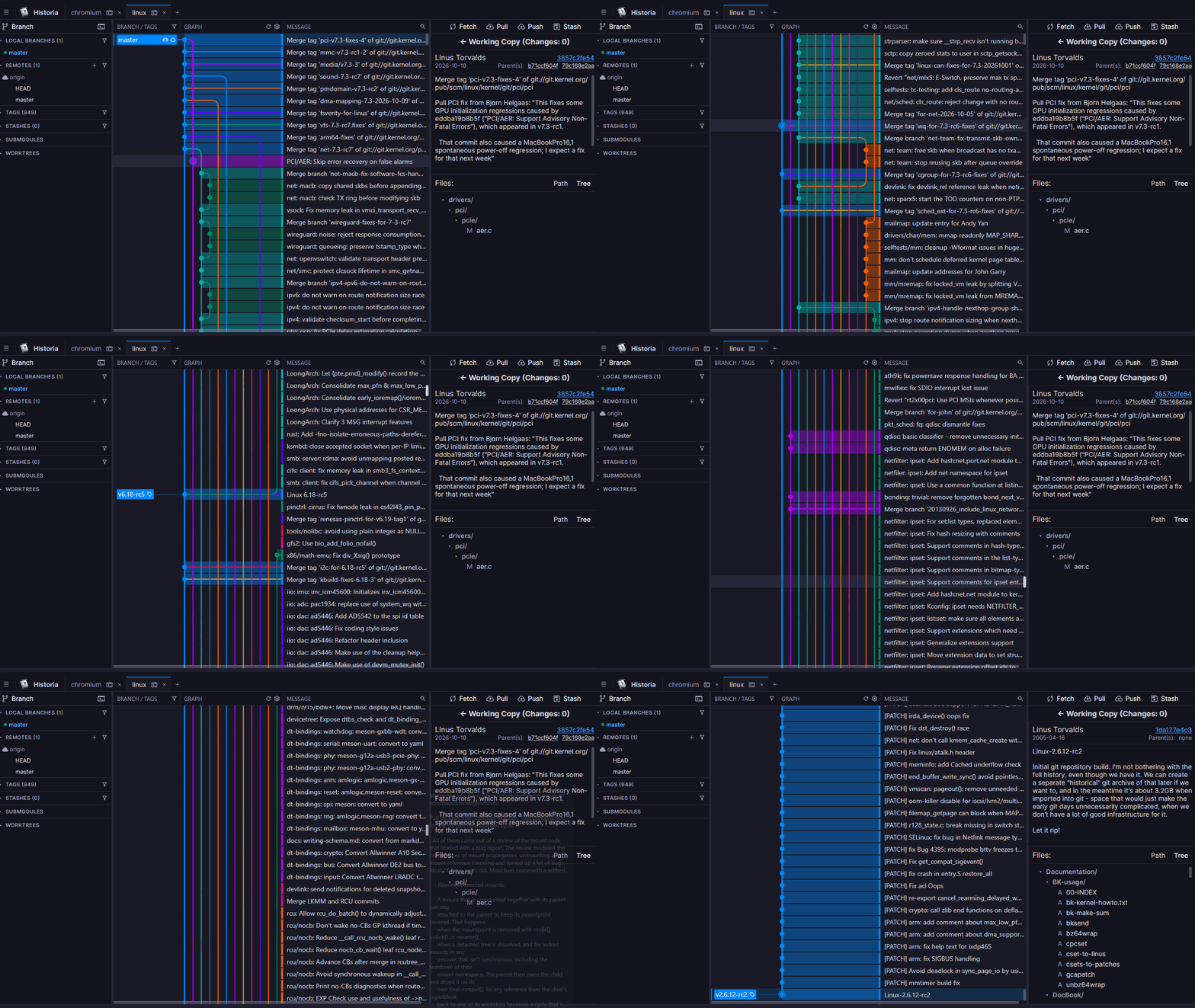
So I decided to put my Claude and Gemini subscriptions to use and build a faster alternative to the commit graph I've come to rely on, with features built for agentic coding. By the renewal date, Historia was far enough along that I decided not to renew. Historia's graph keeps the same easy-to-read orthogonal edge routing, but it can render repos with hundreds of thousands of commits and scroll through them quickly and smoothly. Beyond the graph, agents can point you to what needs your review, and hand you the change they just made to commit. It was built with Claude and Gemini, and it is set up so coding agents can keep working on it safely: the constitution is written to be followed mechanically, and the rules that matter are enforced by tests rather than convention.
My goal is to provide a desktop GUI with a fast and informative graph, available to all users on all repos. It is built around:
- Raw Speed and Responsiveness — fast launch, zero UI lag, and smooth handling of massive repositories (hundreds of thousands of commits), keeping the full history loaded rather than capping it.
- Feature Completeness & Simplicity — advanced power tools (interactive rebase*, line/hunk staging, cherry-pick, submodules, stash management) paired with an intuitive, clean workflow for everyday commits, branching, and conflict resolution.
- Visual Elegance — vivid, color-coded branch lanes, round commit nodes, branch/tag labels, merge arcs, and visual drag-and-drop actions* — engineered for high-performance rendering.
- Progressive Disclosure — essential, everyday workflows (inspecting history, staging, committing, branch switching) remain immediate and distraction-free, while deep Git power tools (interactive rebase*, conflict resolver, hunk staging, submodules, worktrees, terminal, error diagnostics) disclose on demand through context menus, collapsible drawers, and dedicated inspection panels without overwhelming the user.
- Designed with Agentic Coding in Mind — when agents work in parallel, Historia keeps you on top of what they did: they can point you to the exact commit, file or change that needs your review and hand you their staged work to commit, while every commit stays yours to make.
- Confirm Before Destroying Anything: The project's highest rule (constitution Rule 00). No action that discards uncommitted work or rewrites history — discard, clean, hard reset, branch/tag delete, rebase, force-push, stash drop — runs without an explicit modal alert (red warning icon, exact effect named) whose Cancel button is the highlighted default.
- Performance-First Architecture: Powered by native .NET and Avalonia UI; non-blocking Git operations, fast cold starts, and memory that scales with history size (see Trade-offs).
- Progressive Disclosure UI: A layered interface philosophy ensuring zero visual clutter. Common daily operations take center stage with high ergonomic polish; advanced Git machinery and deep technical metadata remain readily accessible but stay tucked behind collapsible sections, contextual actions, and detail drawers until needed.
- Next-Gen Commit Graph: Virtualized rendering (60+ FPS) designed to scroll smoothly across repositories with hundreds of thousands of commits. Features vibrant multi-color branch lanes and orthogonal edge routing with rounded corners.
- Built for Agentic Coding: Agents can open Historia on the exact commit, file or
uncommitted change they just produced, so you review it in a real diff viewer. They can stage
their change and propose a commit message, but only you commit, and nothing they send can
change the repository (constitution Rule 40). The
codebase is built for agent contributors too: see
Working with coding agents and
AGENTS.md. - Power-User Feature Parity: 100% core Git autonomy, visual interactive rebase, granular staging, 3-way conflict resolver, and full repository management (submodules, worktrees, LFS*).
- SSH Only Mode: By default, fetch, pull, and push try the remote's own scheme first and fall back between SSH and HTTPS. Switch a repo to SSH Only to force every network operation over SSH with no HTTPS fallback.
* On the roadmap.
Historia loads your entire commit history instead of capping it at the most recent few thousand commits. That means memory grows with the size of the repo: about 200 MB for a 350k-commit repo, and about 2 GB for Chromium's ~1.8 million commits. In return, the whole history is in one graph, and scrolling through it stays smooth. A lightweight mode that caps the graph at 30k commits for lower memory use is available in settings.
- 📜 Historia Constitution — Architectural invariants, security policies, and performance ceilings.
- 🛣️ Roadmap — Planned features for upcoming releases.
- 🗂️ Plans — Active implementation plans; finished ones move to
completed/. - 🤖 AGENTS.md — The shared instructions for coding agents working on Historia.
- 🔌 Agent integration —
historia-cmdrand sample skills for Claude Code and GitHub Copilot. - 🤝 Contributing Guide — Environment setup, coding standards, PR guidelines, and core tenets.
- Windows: Windows 10 (1809+) or Windows 11
- macOS (in progress): Apple Silicon or Intel; builds must be ad-hoc signed locally (see macOS: ad-hoc signing)
- .NET 10 Runtime (the Desktop Runtime on Windows)
- Git 2.46 or newer. Historia checks the installed version at startup and reports it if Git is missing or too old.
Everything under Requirements, plus the .NET 10 SDK to build from source.
# Build and launch Historia (builds only the app and historia-cmdr)
dotnet run

# Build everything, tests and ScenarioLab included
dotnet build Historia.slnx

# Launch ScenarioLab (test scenario generator & runner)
dotnet run --project Historia.ScenarioLabmacOS (especially Apple Silicon) refuses to launch an unsigned app bundle. If you
don't have an Apple Developer certificate, sign the build locally with an ad-hoc
signature (the - identity). This produces a binary that runs on your own
machine only — it is not distributable and won't pass notarization.
# 1. Publish a framework-dependent build for your architecture
#    (use osx-x64 on Intel Macs)
dotnet publish Historia.App/Historia.App.csproj -c Release -r osx-arm64 --self-contained false

PUB=bin/Historia.App/Release/net10.0/osx-arm64/publish

# 2. Ad-hoc sign the main executable and every native dylib it ships
codesign --force --deep --sign - --timestamp=none "$PUB/Historia"
find "$PUB" -name "*.dylib" -exec codesign --force --sign - {} \;

# 3. Strip the quarantine flag Gatekeeper adds to downloaded files
xattr -dr com.apple.quarantine "$PUB"

# 4. Run it
"$PUB/Historia"
If macOS still blocks the app, open System Settings → Privacy & Security and
click Open Anyway, or run spctl --add "$PUB/Historia".
When packaged as a Historia.app bundle, sign the bundle root instead:
codesign --force --deep --sign - Historia.app
xattr -dr com.apple.quarantine Historia.apphistoria-cmdr (built beside Historia.exe) tells a running Historia what to show, so a script
or a coding agent can point you at the exact commit, file or change to look at. It prints one
line of JSON and exits 0 when Historia is showing it. It starts Historia if none is running.
historia-cmdr show HEAD                     # select and centre a commit
historia-cmdr diff HEAD src/a.cs --line 42  # one file's diff, scrolled to a line
historia-cmdr compare main HEAD src/a.cs    # a file between two revisions
historia-cmdr changes src/a.cs --staged     # an uncommitted change
historia-cmdr selection                     # what Historia is showing now
An agent can also hand you a change it staged: historia-cmdr propose-commit -F - (message on
standard input) opens the staged diff and pre-fills the commit box. You review the files and
click Commit; if you already typed a message, it is offered, not swapped in.
It navigates and proposes, nothing else — it can't stage, commit or change your repository or
settings. It talks to Historia over a local, per-user pipe, never the network, and can be turned
off in Settings → Privacy & Network. Sample skills for Claude Code and GitHub Copilot (VS Code)
are in docs/Historia-commander-skills/.
Historia is released under the MIT License.
Copyright (c) 2026 Kevin Chen.
Bundled third-party material is credited in
docs/third-party-licenses.md: the
Material Symbols icon set (Apache-2.0);
the diff viewer and conflict editor adapted from
SourceGit (MIT); editor libraries
AvaloniaEdit, TextMateSharp, onigwrap, and DiffPlex; and terminal libraries XTerm.NET,
Porta.Pty, and Microsoft.Windows.Console.ConPTY.
Historia stands on the shoulders of the open source Git clients that came before it. Thank you to everyone who has built and shared one. Special thanks to SourceGit, from which Historia has directly reused code.
0 comments
log in to comment.