

Pick it in RomM. Play it on Slot. Label included.
SlotDrop puts games from your RomM library
onto a Slot SD card, each with its cartridge label and
shell colour. One SlotDrop.exe, nothing to install.
Please read this first.
I'm not a developer by any means. My day job is infrastructure as code, and that's about the extent of my coding: I can read and understand code, but I can't write an app like this from scratch. SlotDrop started as an idea in my head. When I showed a proof of concept to Slot's lead developer, he gave me his blessing to go ahead and make it.
It was built with Claude by Anthropic. I steered it with a security-first approach (warnings about insecure connections, up-to-date patched dependencies, a security review before release) and Claude did the rest of the building.
It has been tested against a RomM 5.4 server. It does not sync saves (yet). I just wanted something simple: instead of downloading a game, unzipping it and dropping it onto the card by hand, SlotDrop does it all for you, backed by RomM, your powerful, beautiful ROM management system.
Use it at your own risk, and keep a backup of your SD card.

- Browse and search the GBA, Game Boy and Game Boy Color games in your RomM library.
- Click + and the game is downloaded (unpacking .zip, .7z or .rar) into
Games\<GBA|GB|GBC>on the card. - Its label is cut from RomM's cartridge photo and saved to
Labels\<system>\<game>.png, and a shell colour is written toLabels\cart_shell.txt. - Pick a shell colour and a Solid, Clear or Glitter finish, redraw the label crop, or use your own image.
- Remove a game from the card (your saves stay) and eject the card safely.
| Pick a game | Tick several and add them at once |
|---|---|
 |
 |

- Windows 10 or 11 (the window uses WebView2, which both already have).
- A RomM server you can sign in to, with a password, an API token, or your phone (RomM 5.4 or newer). An API token only needs platforms.read and roms.read (SlotDrop only reads). Give it an expiry rather than Never; a year is plenty.
- Labels are cut automatically from RomM’s
physicalcartridge photos. RomM doesn’t download these by default: turn on physical in its scan media settings, re-scan your library, then restart SlotDrop. Games without one still install, and you can pick your own label image. - An SD card set up for Slot.
-
Download
SlotDrop.zipfrom Releases, unzip it and runSlotDrop.exe. Windows SmartScreen may warn you because the app isn't code-signed; you can check the SHA-256 in the release notes. -
If your Slot card is plugged in it's picked up automatically. Otherwise click it in the list, or use Choose folder….
-
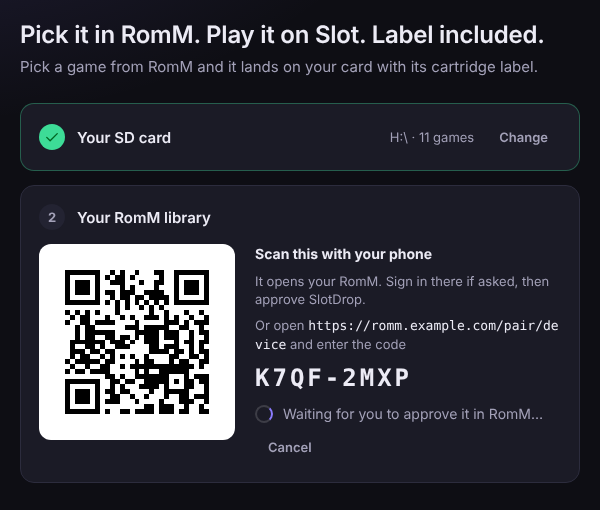
Sign in to RomM with your password or an API token, or pick Phone (QR), scan the code and approve SlotDrop in RomM on your phone. Leave Remember me ticked and it signs you in by itself next time.
-
Search at the top, then click + on a game. To add several, tick the circle on each game and press Add N games in the bar at the bottom.

Click any game to see its cartridge. For games on the card you can pick a shell colour (GBA Grey is what new games get; Slot draws a game with no colour in plain black), choose a finish, redo the label by dragging a box on RomM's cartridge photo, or Use my own image…. If games on the card have no label, Make labels does them all. When you're done, the eject button next to the card in the top bar makes it safe to pull out.
You need Go 1.26 or newer. Then double-click build.bat,
or run:
go build -trimpath -tags desktop,production -ldflags "-H windowsgui -s -w" -o SlotDrop.exe .
From Linux or macOS, put GOOS=windows GOARCH=amd64 in front.
Run the tests with go test ./....
The app icon and Windows manifest live in build/winres and are compiled into
rsrc_windows_amd64.syso with go-winres:
go-winres make --in build/winres/winres.json --arch amd64.
- Your RomM password or token is only kept if you tick Remember me, and then
only encrypted with Windows DPAPI, so only your Windows account on that PC
can unlock it. It lives in
%APPDATA%\SlotDrop\settings.json. Sign out in the RomM menu forgets it. - Your login is only ever sent to your RomM server and never written to a log.
- Signing in with your phone gets a token with only the two read permissions
SlotDrop needs. The QR code only ever points at your own RomM address, and
you can remove SlotDrop from RomM's device list at any time.
If your server address is HTTPS, the login is never sent over plain HTTP,
even after a redirect. Using an
http://address shows a warning. - HTTPS certificates are checked against the Windows certificate store, like your browser.
- Game and file names from RomM are shown as plain text, never run as code. The page has a strict Content Security Policy and loads nothing from the web.
- Downloads have size limits, zips are read in memory, file names are cleaned
for FAT32/exFAT, and games are written to a
.partfile first so a failed copy never looks like a game.
Found a security problem? Please open an issue saying so, without the details, and I'll get in touch.
| Where | What |
|---|---|
main.go, app.go |
the window, and what the page can ask the app to do |
frontend/ |
the page: index.html, style.css, app.js, icons.js |
internal/romm |
talks to RomM's API |
internal/sdcard |
Slot's folders and cart_shell.txt (reads the old .ini too) |
internal/label |
finds the label on a cartridge photo and cuts it out |
internal/match |
pairs card games with RomM games (name, then checksum) |
internal/core |
ties it together: adding games, making labels |
internal/secret, internal/settings |
the encrypted saved login |
build/winres, rsrc_windows_amd64.syso |
the app icon and Windows manifest |
preview.go |
development only: runs the page in a browser with a fake RomM (go run -tags preview . <card folder>) |
MIT, see LICENSE.
SlotDrop is an unofficial companion app and isn't affiliated with RomM or Slot. You're responsible for owning the games you put on your card.
0 comments
log in to comment.