

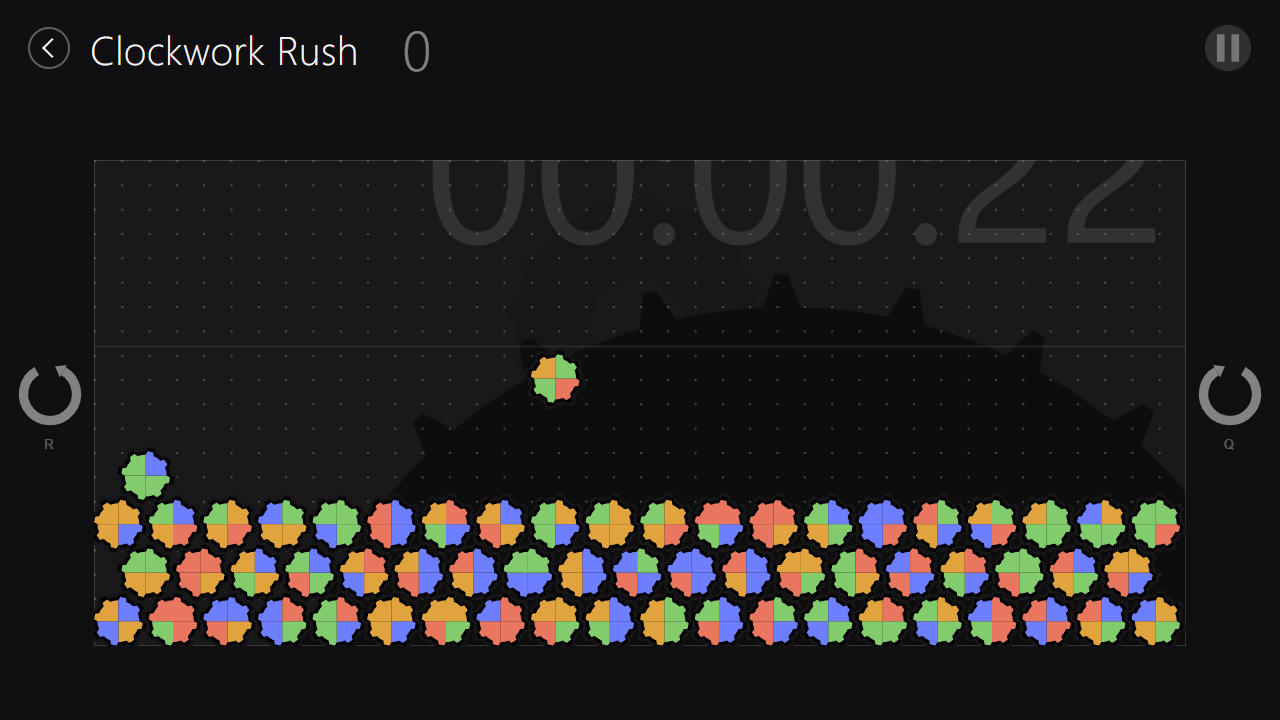
A gear-matching puzzle game. Land a falling gear so its colours line up with the gear beneath it and both grind away — then rotate the whole board a quarter turn and do it again.
Play it: https://clockwork-rush.ping6163.workers.dev
I wrote Clockwork Rush in 2013 as a Windows 8 Store app — WinRT and XAML, C#,
with the gears drawn as procedural vector PathGeometry rather than sprites. It
shipped on the Windows Store under my publisher name, Dinetopia.
I'm the original author. Windows 8, the Store as it existed then, and WinRT itself have all long since moved on, and the game went with them — so in 2026 I had it ported to the browser. The original C# is still in this repo, untouched, next to the port.
The port is deliberately faithful. It's the same engine logic, the same staggered gear lattice, the same collision and match rules, the same procedural gear geometry, and the same block-letter WIN / LOSE banners — just expressed in JavaScript, DOM and CSS instead of C# and XAML. Even the tutorial screenshots are the 2013 originals.
The look is not incidental — it's Windows 8's design language, which Microsoft called Metro until it dropped the name shortly before Windows 8 shipped. Flat colour, no gradients or bevels, content instead of chrome, and big light-weight Segoe UI. The source is full of fossils from it: every page declares the four Win8 view states —
FullScreenLandscape · Filled · FullScreenPortrait · Snapped
— because an app could be shoved into a 320px sidebar next to another one and
was expected to have a layout ready for it. There's a WideLogo.png for the
live tile, a SuspensionManager for the suspend-and-terminate lifecycle, and
1,845 lines of StandardStyles.xaml holding the type ramp.
All of that went away. Windows 10 replaced snapping with ordinary windows, Fluent brought back depth and shadow, and Windows 11 dropped live tiles entirely. But what dated was the chrome, not the content — flat saturated shapes on a black field still look like a deliberate choice rather than a period detail. Nothing about the game's appearance needed updating for the port; everything thrown away was scaffolding.
Gears sit on a staggered lattice. Each gear covers a 2×2 block of cells, and each cell is one coloured quadrant of it.
- A new gear drops in whenever the last one settles. Land it so its bottom two colours match the top two colours of the gear underneath, and both grind away.
- Rows are offset, so a gear can straddle two gears at once. Match that way and you clear both — worth three times as much.
- Gears left with nothing under them crumble on their own. That's where the combos come from: a clear propagates along the diagonals.
- The clock drains points the whole time, so speed pays.
- Clear the entire board to win. Let the pile reach the top and you lose.
The board is always in one of four rotation states — 0°, 90°, 180°, 270°. Switching quickly between them looking for matches is the whole game.
A S D or arrow keys |
Move the falling gear |
Q / R |
Rotate every gear a quarter turn — neighbouring rows turn opposite ways, like meshed gears |
| Click or touch and drag | Move the falling gear directly, anywhere below the timer line |
P or Esc |
Pause |
On a phone all the controls sit in one row under the board. The game is happiest in landscape; upright it will suggest you turn the device, but only when the board is genuinely too wide to be playable at that size.
W, E and F show greyed out on the Controls help page because they were
never wired up in 2013 either.
The folder names are older than the game is, so they need some explaining. This is three passes at the same idea, oldest first.
A WPF proof-of-concept, from before any of it looked like gears. The board is
one plain Ellipse per cell on a 15px grid, filled straight from the model —
red, blue, green, black. Where the finished game draws a single gear with four
coloured quadrants, this draws four separate coloured circles.
Most of the game isn't there yet: no combos, no cascades, no win condition. But
the bones of the engine already are — AddBlock, CheckCollision,
GetCollision, GlanceLeft, GlanceRight, HitBottom and RotateRow all
survive by name into the finished game.
Two things in it point at what came next. Commented out in the middle of the
draw loop is a first attempt at an ArcSegment, which eventually grew into the
gear geometry. And a to-do near the top —
// Add events for:
// Glance Left, Glance Right, Merge, Tick, Remove
— is the engine/view split the real game ended up being built on.
"Rotetris" was the working title: rotate + Tetris. It outlived itself. The
engine in the shipped Store app is still namespace Rotetris.
The 2013 Windows Store app: WinRT, C#, XAML views. Unchanged from what was
published. It's named after the part that took the longest — UIGear.cs builds
every gear procedurally as vector paths, teeth and root circle and four coloured
quadrants, with no bitmaps anywhere. Rotetris.cs is the engine, headless and
raising events for a view to draw. The Help*.xaml pages are the tutorial, and
several of those screenshots have their explanations burned into the image.
Plain HTML, CSS and JavaScript. No build step, no dependencies, no frameworks.
The engine is a line-for-line port; the view is rebuilt as DOM and CSS, with the
gears redrawn as SVG from the same geometry UIGear.cs used.
web/README.md has the technical detail — what maps to what, how the view
animates, and the handful of places the port deliberately departs from the
original.
Everything else is scaffolding: wrangler.jsonc and package.json deploy the
site to Cloudflare, and the two .sln files still open the old C# projects in
Visual Studio, if you have a copy old enough to build them.
It's a folder of static files; any static server will do.
npx wrangler devThen open http://localhost:8787.
No license is granted. This code is published for reference and for the history of the thing, not for reuse. All rights reserved by the author.
The audio and artwork are mine as well and are not licensed for reuse.
0 comments
log in to comment.