


Artists say what's theirs. Everyone else gets to see it.
Somebody uploads an AI-generated song under a real artist's name, and it lands on that artist's Spotify page next to their actual records. The scammer gets the royalties. Same trick with books: a knockoff goes up under a real author's name, or a near-copy of a title that just did well, and the fans who buy it think they bought the real thing.
The platforms could fix this by asking the artist first. Spotify is beta-testing exactly that. Amazon, Goodreads, Apple and Deezer aren't doing anything like it, and the wait has been long enough.
So: snapshot your own profile, untick the stuff that isn't yours, publish that as a list. The extension watches your profiles for new junk and hands you the takedown packet. Other people subscribe to your list and see the fakes flagged on the page before they press play or buy.

- Install it — pending store review, so you load it unpacked for now
- For artists and authors — snapshot, alerts, takedowns
- Make your own list — publish it, optionally prove it's you
- For slopblockers — subscribe, badges, list updates, uBlock export
- How it gets the data
- What it won't do
- How the trust works and the research behind it
It's submitted to the Chrome Web Store and waiting on review, so there's no install link yet. An extension asking for this many host permissions tends to draw a slower look than a trivial one, so I'd expect this section to be here a while. Until it clears, build it and load the folder.
npm installnpm run buildThen open chrome://extensions, turn on Developer mode, click Load unpacked, and pick the dist
folder. npm run watch rebuilds while you work.
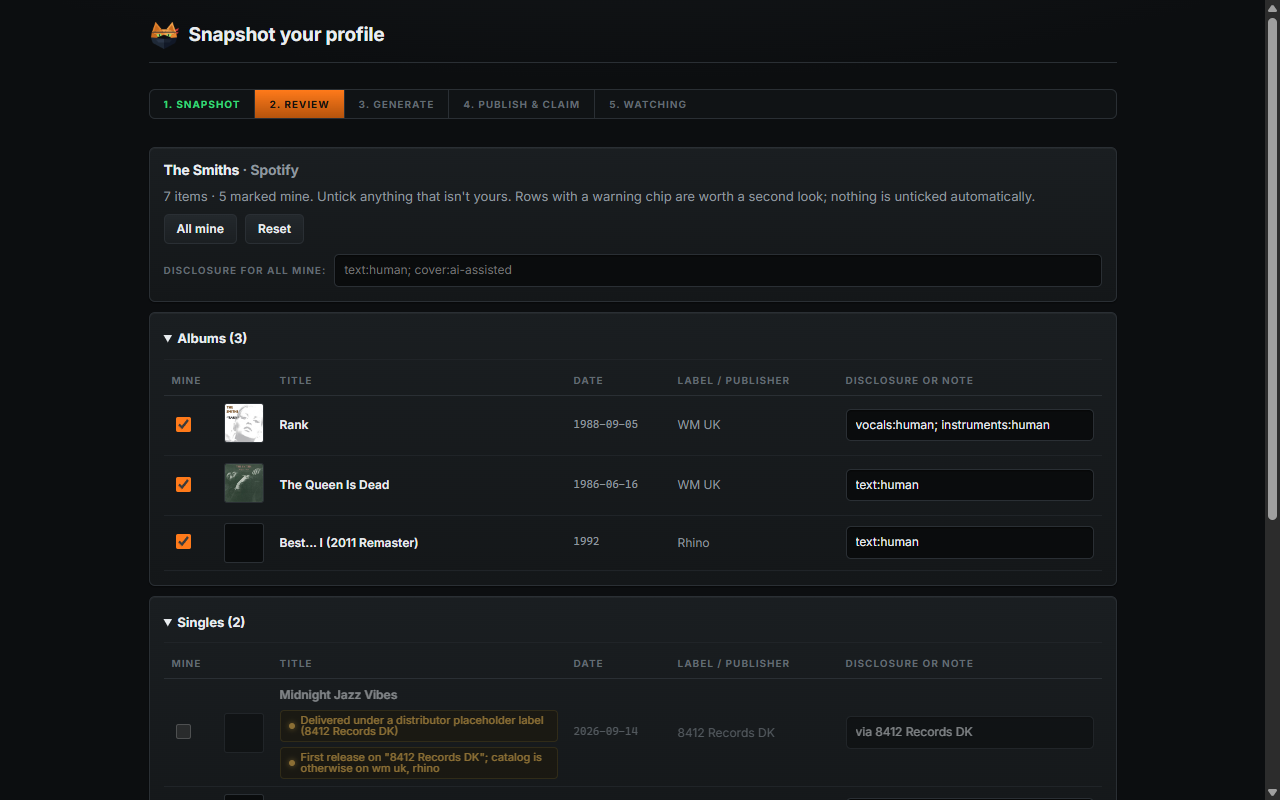
Open your own artist or author page, click the Sloppycat icon, hit Snapshot this profile. It reads the public catalog the same way a fan's browser would.

Supported: Spotify artist pages, Apple Music artists, Deezer artists, Amazon author pages, Goodreads author pages. You can also paste a URL in Settings if you'd rather not open the page.
Everything starts ticked as yours. You untick what isn't. Nothing is unticked for you, because a guess about your own catalog is worse than no guess.

Releases are grouped by type. "Appears on" starts off, since those are other people's records you play on. Anything odd gets a chip explaining why it caught the extension's eye, like a release that came through a distributor's placeholder label when your whole catalog is on one label. A chip is a reason to look, not an accusation. Plenty of honest releases have one.
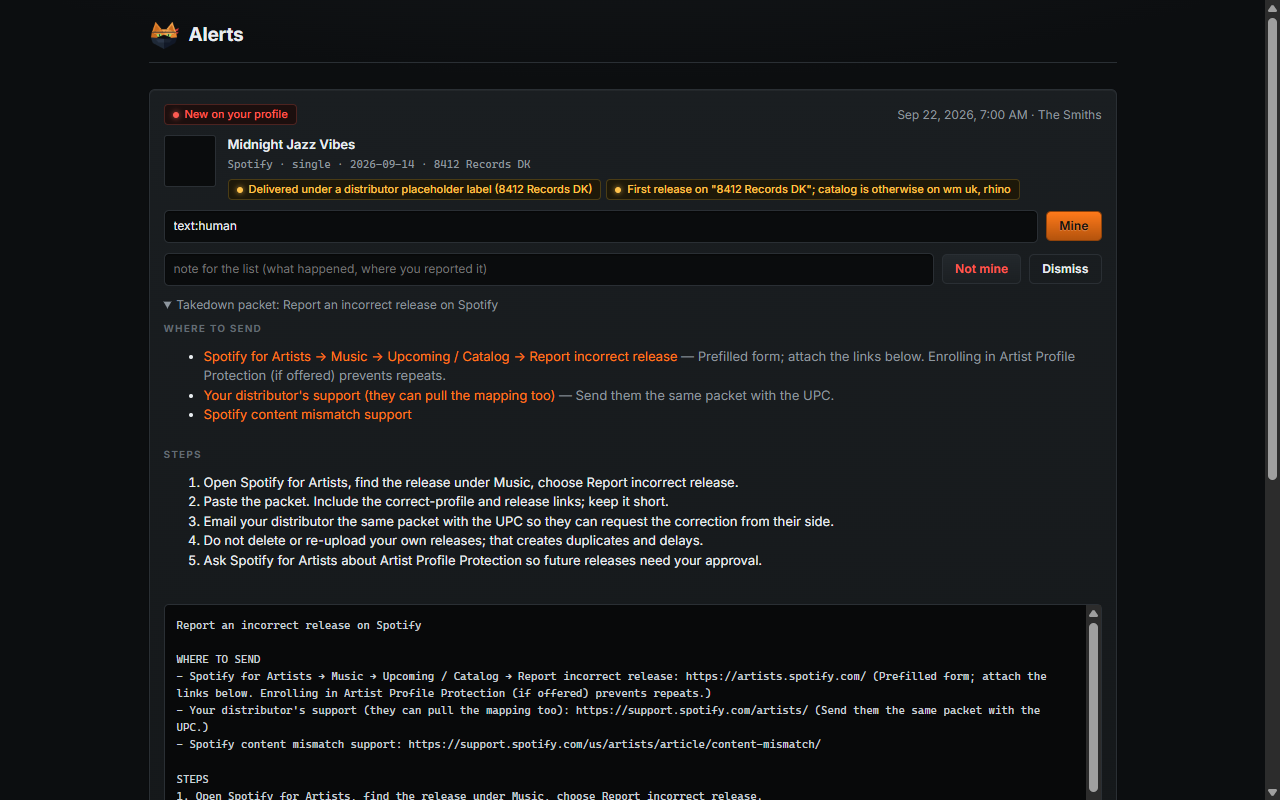
The moment you untick something, you get the letter for it: where to send it, what to paste, which form, in the right order, with your profile links and the ASIN or album id already filled in.

Each platform gets its own version, because the routes are genuinely different. Spotify wants the report form plus your distributor, and it matters that you don't delete and re-upload your own release while you wait. Amazon splits in two: if the fake is sitting on your author page that's Author Central, and if someone is selling under your name somewhere else that's the infringement form.
After the snapshot it keeps checking on a timer, default every twelve hours, minimum fifteen minutes. Anything new that you haven't already claimed becomes an alert with its packet ready.

It also searches for near-copies of your titles somewhere else on the platform, which is the other half of this scam and the half a profile check can't see.
Two limits worth knowing. Checks only run while Chrome is open, which is as far as an extension reaches. And Spotify only hands over your ten newest albums and ten newest singles, so a fake uploaded with an old date sits where that view never reaches: the extension pages past it where it can, and watches the release counts to catch it where it cannot. The full list is in what it cannot see.
Most of the above is written for the account holder, but the watching half works just as well on a page you don't own. Open an artist or author you follow, hit I follow this artist, and the wizard takes one snapshot as a baseline and stops there. No list to write, no bio to claim, no takedown letters, because none of that is yours to do. You get told when something new turns up, with the same signals attached, and if that artist publishes a list of their own you can subscribe to it from the last step so their answer arrives with the alert.
There is a Testing panel in Settings that plants an alert on a watched profile, so you can walk the whole path without waiting for a real one.
Your list is a Markdown file. That's the whole format. GitHub renders it, people can read it without any tooling, and a pull request against a community list is reviewable by a human.
# Jane Doe — verified catalog
<!-- sloppycat/v1 -->
Title: Jane Doe — verified catalog
Type: creator

## Creator
| platform | profile |
|---|---|
| spotify | https://open.spotify.com/artist/0123456789abcdefghijkl |

## Mine
| platform | id | title | disclosure |
|---|---|---|---|
| spotify | 4aBcdefghijklmnopqrstu | Blue Room | vocals:human; art:ai-generated |

## Not mine
| platform | id | title | first seen | note |
|---|---|---|---|---|
| spotify | 9xYcdefghijklmnopqrstu | Midnight Jazz Vibes | 2026-09-14 | not ours, reported 15 Sep |
The wizard writes this for you at the end of the snapshot. Copy it, or download it, or let it open GitHub with the file already filled in.
Publish it anywhere with a plain https URL. A public Gist is the least work, and it's the one host every copy of the extension can already read; on your own domain, Chrome asks each subscriber once to allow that host when they add your list. The raw URL is what people subscribe to. The file the wizard writes opens with a comment saying what it is, where to get the extension, and how to add the list, because someone following the link from your bio lands on raw Markdown with nothing else to go on. It's a comment, so it stays out of the way of anyone who already knows.
Optionally, prove it's you. Paste that URL into a bio only you can edit: Spotify for Artists, Amazon Author Central, or a claimed Goodreads profile. The extension reads your bio, follows the link, and checks the list names that same profile back, and subscribers' cards say so. No account, no signup, nothing to trust me with.
This is a label, not a requirement. Your list works without it, and it keeps working if you take the link back out. Nobody should have to treat a line of their bio as permanent infrastructure, and two of the five platforms give you nowhere to put one anyway. How the trust works goes through why.
The disclosure column is yours to use or ignore. If you used AI for the cover and not the words, say so and
it shows up on the hover card. Music keys are vocals, instruments, postproduction, art, lyrics.
Book keys are text, images, cover, translation. Values are human, ai-assisted, ai-generated.
Anything else you write still displays.
Labels, managers and lawyers: one list can cover a whole roster. Put every artist's profile in the Creator table and publish once. You already hold this data, it's what your DDEX or ONIX feed says. Nobody publishes it anywhere a browser can read, which is the only reason this scam works as well as it does.
Full spec: docs/list-format.md.
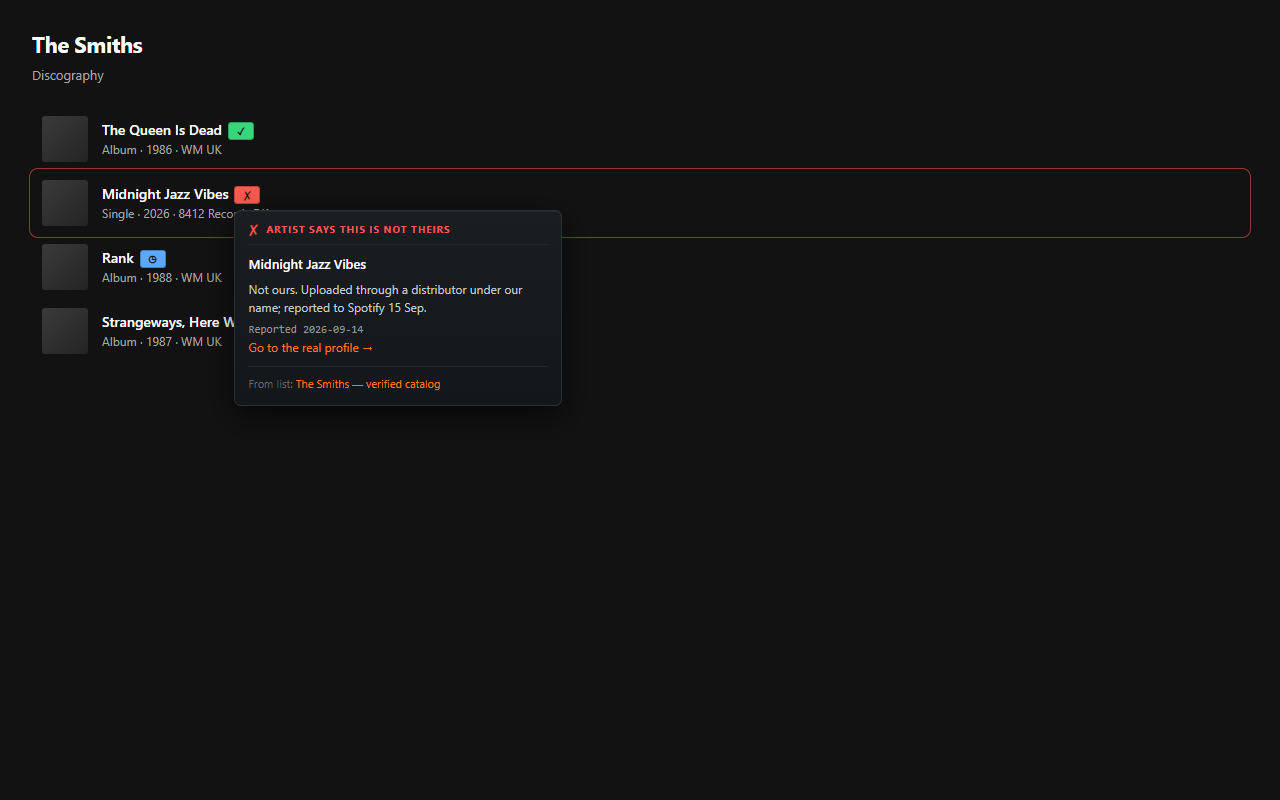
Subscribe to lists the way you'd subscribe to filter lists in uBlock. Items get a badge on the page, and hovering gives you the card.

| green ✓ | the artist says this one is theirs |
| red ✗ | the artist says this is not theirs |
| blue ◷ | released before the cutoff, so probably fine, but nobody has confirmed it |
| grey ○ | this artist is enrolled and hasn't said either way yet |
No badge at all means no list covers it. Silence, rather than a guess.
Add sources in Settings. One community list ships enabled; any creator's Gist URL works.
Lists are re-fetched every few hours, and each fetch is compared with the last one. What changed goes to List updates, reachable from the popup and from Settings: a release an artist has just confirmed as theirs, a new fake they have flagged, or an accusation they have withdrawn. You get one notification per refresh rather than one per row, the first fetch of a list you just added counts as the starting point rather than news, and removing a list takes its history with it. If you would rather not hear about it, the toggle is next to Notifications in Settings.

Already running uBlock Origin and don't want another extension? Export any subscribed list as a cosmetic filter list and the flagged items get hidden instead of badged. You lose the report card, which is most of the point, but it works.
| Platform | How | Notes |
|---|---|---|
| Spotify | Reads the artist data the web player itself loads | Their public API closed in Feb 2026, and the discography page only keeps two albums in the DOM at a time. Gives the 10 newest albums and singles, which is where a hijack shows up anyway. |
| Apple Music | iTunes lookup API | Free, no key. |
| Deezer | Public API | Free, no key. |
| Amazon Books | Renders your author store pages in a hidden tab | The pages are JavaScript now, so there's nothing to fetch. Runs in your own session, so it looks like you browsing, because it is. |
| Goodreads | Fetches the author list pages | Still server-rendered. No API since 2020. |
| Google Books | Volumes API | Only used to spot lookalike titles. |
Nothing leaves your browser except requests to those platforms and to the list URLs you subscribed to. There is no server, no account, and nowhere for me to see any of it.
It doesn't detect AI. Spotify and Deezer already badge AI-generated music and it doesn't help here: a fake on your page is credited to a human, so nothing flags it. The only person who actually knows whether a release is yours is you, so yours is the word the badges carry.
It doesn't file anything for you. It writes the letter and points at the form. You press send.
It doesn't accuse people on a hunch. The heuristics are there to help you look in the right place. They never end up on anyone's screen as a verdict. A row only reaches the shared community list if the creator confirms it, or two curators check it and sign off: see lists/CONTRIBUTING.md.
npm testnpm run typechecknpm run previewpreview serves the extension pages with a fake browser API so you can poke at the UI in a normal tab;
/demo renders the overlay against a mock platform page, which is where these screenshots come from.
Also here: privacy · store submission notes · what it cannot see · who gets to speak for a profile · user reports · research, with sources · the list format · what ships in the default list · how the community list is policed · marketing notes
An ad blocker is useless without filter lists, and those exist because people commit to maintaining them in public. Same deal here. The code is the easy half. The half that matters is getting lists published by rights holders, labels, and the lawyers and journalists who've been explaining this scam to the people it happens to. If you're one of those people, the format is open and you don't need my permission or an account to publish. See docs/marketing.md for who's being asked and why.
It's a band-aid. The real fix is the platforms asking first, and one of them is finally trying it. Until the rest catch up, this is the part an artist can do without anybody's permission.
0 comments
log in to comment.